Why Isn’t My Microwave Heating Up: Top Causes and Fixes
Have you ever put your food in the microwave, pressed start, and waited—only to find it still cold after the timer ends? Many people face this problem, and it can be frustrating, especially when you’re hungry or in a hurry.
When your microwave isn’t heating up, the issue can be simple or complex. Understanding the possible reasons can help you fix the problem or know when to call a professional. Let’s look at the most common causes, signs to watch for, and practical steps you can try.
By the end, you’ll know why your microwave isn’t heating up and what to do about it.
How Microwaves Heat Food
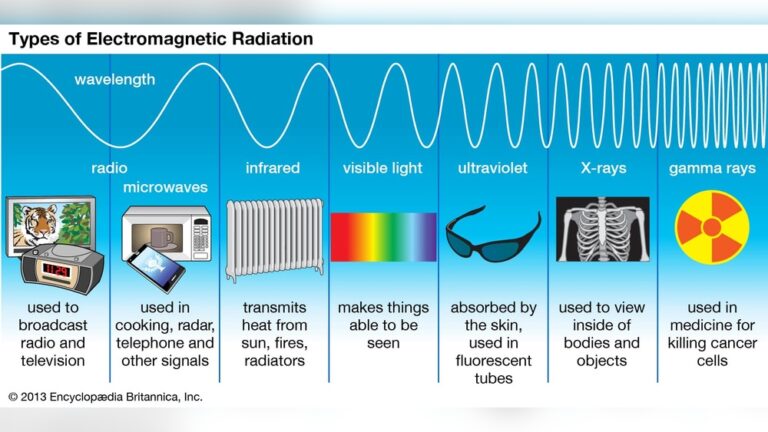
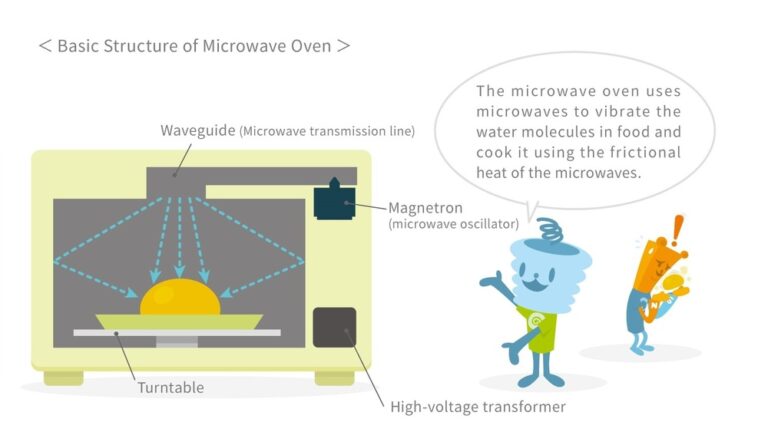
Microwaves use microwave radiation to heat food. Inside, there is a part called the magnetron that creates waves. These waves make water molecules in your food vibrate, which heats the food quickly. If any part of this system fails, your microwave may stop heating.
Common Reasons Your Microwave Isn’t Heating Up
Many different things can cause a microwave to stop heating. Sometimes, it’s a small issue you can fix yourself. Other times, it’s a big problem that needs a technician. Here are the most common reasons:
1. Faulty Magnetron
The magnetron is the heart of the microwave. If it’s broken, the microwave can’t make heat. Usually, when the magnetron fails, your microwave will still turn on, but food stays cold.
Signs:
- Microwave runs but food is not warm.
- No strange noises, just normal operation.
Tip: Replacing a magnetron is expensive. In many cases, it’s better to buy a new microwave, especially if yours is old.
2. Blown Diode
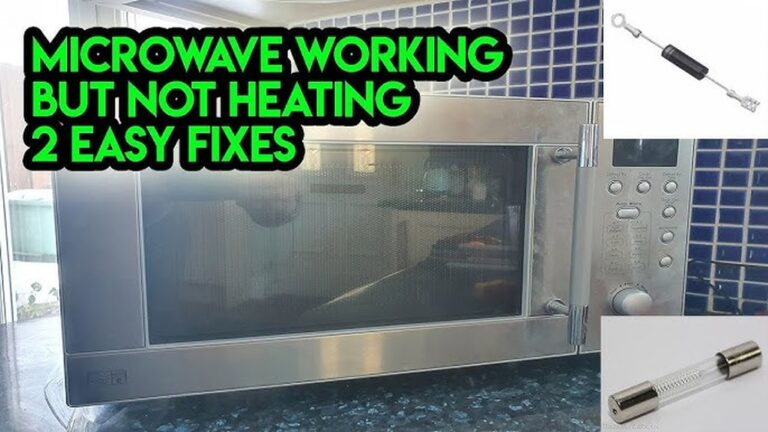
The high voltage diode converts electricity so the magnetron works. If this diode is blown, the magnetron won’t get power.
Signs:
- Microwave runs but does not heat.
- Sometimes, you hear a buzzing sound.
Tip: Diodes are cheaper to replace than magnetrons. If you are comfortable with electronics, you can check and replace it, but be careful—microwaves store high voltage even when unplugged.
3. Door Switch Issues
Microwaves have several door switches for safety. If any switch is broken or not pressed properly, the microwave won’t heat.
Signs:
- Microwave doesn’t start, or starts but doesn’t heat.
- Light inside may not turn on.
Tip: Try closing the door firmly. If it feels loose or doesn’t click, a switch may be broken.
4. Faulty Capacitor
The capacitor helps the microwave store energy for heating. If it’s damaged, the magnetron won’t work.
Signs:
- Microwave hums but doesn’t heat.
- Sometimes, you see sparks or smell burning.
Tip: Capacitor problems need professional repair. Do not open the microwave yourself, as capacitors can shock you even when unplugged.
5. Defective Control Board
The control board is like the brain of the microwave. It tells other parts when to start and stop.
Signs:
- Display works, but microwave doesn’t heat.
- Buttons may work strangely.
Tip: If you see error codes or strange behavior, the board might be faulty. Boards are expensive to replace.
6. Burnt Out Fuse
Microwaves have several fuses to protect against power surges. If a fuse blows, your microwave may turn on but not heat.
Signs:
- Microwave powers on but doesn’t heat.
- Some functions may work, others don’t.
Tip: Fuses are cheap and easy to replace if you know how. If you open the microwave, be careful.
7. Damaged Power Supply
If your power supply is weak or unstable, the microwave may not get enough energy to heat.
Signs:
- Microwave runs weakly.
- Lights dim when microwave starts.
Tip: Try plugging the microwave in another outlet. If it works, your power supply may be the issue.
8. Incorrect Settings
Sometimes, the problem is simple: incorrect settings. For example, using the “defrost” mode instead of “cook.”
Signs:
- Microwave runs but food stays cold or barely warms up.
- Timer finishes quickly.
Tip: Double-check your settings before starting.
9. Faulty Waveguide Cover
The waveguide cover directs microwaves into the cooking chamber. If it’s dirty or damaged, microwaves may not reach your food.
Signs:
- Food heats unevenly.
- Sparks or burning smell.
Tip: Clean the cover regularly. If damaged, replace it.
10. Broken Turntable
The turntable moves food so it heats evenly. If it’s broken, some parts of your food stay cold.
Signs:
- Food heats unevenly.
- Turntable doesn’t spin.
Tip: Make sure the turntable is placed correctly.
Signs Your Microwave Isn’t Heating
Before you try to fix your microwave, look for these clear signs:
- Food is cold after cooking time
- Microwave sounds normal, but nothing heats up
- Light and display work, but food stays cold
- Sparks, burning smell, or buzzing noise
If you notice any of these, your microwave probably has a heating issue.
Diy Fixes For A Microwave Not Heating
You can solve some microwave problems yourself. Here are safe steps you can try:
1. Check The Power Source
Make sure your microwave is plugged in properly and the outlet works. Sometimes, the outlet is the problem, not the microwave.
2. Reset The Microwave
Unplug the microwave for five minutes. Plug it back in. Sometimes, this resets the control board.
3. Inspect The Door
Open and close the door firmly. If the door feels loose or doesn’t click, the switches may not engage. Try cleaning the door latch.
4. Examine The Settings
Check if you are using the correct cooking mode. Avoid “defrost” or “timer” if you want to heat food.
5. Clean The Waveguide Cover
Remove any food or grease from the waveguide cover. Use a damp cloth. Don’t use harsh chemicals.
6. Test Different Outlets
Try plugging your microwave in a different outlet. If it works, your outlet is the issue.
7. Check The Turntable
Make sure the turntable is seated correctly and spins when the microwave runs.

Credit: www.youtube.com
When To Call A Professional
Some microwave issues are dangerous to fix yourself. If you suspect a problem with the magnetron, capacitor, or control board, call a technician. Microwaves store high voltage, which can shock you even when unplugged. Repair costs can be high, so compare the price of repair and replacement.
Here is a quick comparison of repair costs versus replacement:
| Part/Service | Average Repair Cost | Replacement Cost |
|---|---|---|
| Magnetron | $100 – $250 | $150 – $400 |
| Diode | $50 – $100 | $150 – $400 |
| Control Board | $120 – $300 | $150 – $400 |
| Capacitor | $80 – $180 | $150 – $400 |
If your microwave is more than five years old, replacement is often better. Newer microwaves are more energy efficient and safer.
How To Prevent Microwave Heating Problems
Taking care of your microwave can help prevent problems. Here are some practical tips:
- Clean your microwave regularly. Grease and food build-up can cause sparks.
- Use microwave-safe containers only. Metal or foil can damage parts.
- Don’t slam the door. Gentle closing protects door switches.
- Avoid running the microwave empty. This can damage the magnetron.
- Check the turntable position before use.
- Follow manufacturer’s instructions for use and cleaning.
These steps can help your microwave last longer and work properly.
Comparing Different Microwave Types
Not all microwaves are the same. Some are more likely to have heating issues than others.
| Type | Heating Efficiency | Common Issues |
|---|---|---|
| Solo Microwave | Good for basic heating | Magnetron failure, door switch |
| Grill Microwave | Good for grilling + heating | Grill coil failure, diode |
| Convection Microwave | Excellent, heats and bakes | Control board, fan motor |
Solo microwaves are simpler and easier to repair. Convection microwaves have more parts, which means more things can go wrong.
Non-obvious Insights For Beginners
Many people think microwaves just stop working suddenly. But often, small issues build up over time:
- Gradual loss of power: If your microwave heats food slower over weeks, it may be losing power. This is a sign of magnetron or capacitor wear—not just a sudden failure.
- Humidity and environment: Microwaves placed in humid kitchens or near sinks may have more electrical problems. Moisture can damage internal parts.
Always pay attention to small changes in performance. Fixing small issues early can prevent bigger problems.

Credit: www.youtube.com
What To Do If You Need A New Microwave
If your microwave is old or repair costs are high, consider buying a new one. Look for:
- Energy efficiency: New microwaves use less power.
- Safety features: Modern microwaves have better door switches and child locks.
- Warranty: Choose brands with good support.
Compare models before buying. For more information about microwave safety and performance, visit Wikipedia.
Frequently Asked Questions
Why Does My Microwave Run But Not Heat Food?
This usually means the magnetron or diode is faulty. Sometimes, door switches don’t engage fully. Check the settings and door first. If the problem continues, a technician should look at the internal parts.
Is It Safe To Fix A Microwave Myself?
Some fixes are safe, like cleaning or checking the turntable. But anything inside the microwave—like the magnetron or capacitor—is dangerous. These parts store high voltage and can shock you even when unplugged. Only trained professionals should repair these parts.
How Long Should A Microwave Last?
Most microwaves last 7–10 years with normal use. If you clean and use them properly, they may last longer. But older microwaves may become less efficient and unsafe.
What Are Signs A Microwave Needs Replacement?
If your microwave has frequent heating problems, sparks, burning smells, or is more than five years old, replacement is a good idea. Also, if repair costs are more than half the price of a new microwave, buy a new one.
Can Humidity Damage A Microwave?
Yes, humidity can cause electrical problems. Moisture can get inside and damage parts like the control board or magnetron. Keep your microwave dry and away from sinks or steam.
A microwave that isn’t heating up can be annoying, but with careful checks and safe steps, you can often find the cause. Many issues are simple to fix, while others need a professional. Remember, safety comes first—never open the microwave’s internal parts unless you’re trained.
Taking care of your microwave and watching for early signs can help prevent bigger problems and keep your kitchen running smoothly.