How to Unlock a Microwave Panasonic: Quick & Easy Steps
Have you ever tried to heat your food, only to find your Panasonic microwave locked and unresponsive? It’s frustrating when you’re in a hurry and your microwave won’t open or start.
But don’t worry—unlocking your Panasonic microwave is easier than you might think. Whether the child lock was accidentally activated or the control panel seems stuck, you can get your microwave working again quickly with a few simple steps. In this guide, you’ll learn straightforward, proven methods to unlock your Panasonic microwave so you can get back to cooking without delay.
Keep reading—your solution is just a few button presses away!
Panasonic Microwave Lock Basics
Understanding the basics of the Panasonic microwave lock helps in handling the device easily. Many users face the locked microwave panel and get confused. Knowing why the microwave locks and how the child safety lock works can save time. This knowledge also prevents accidental damage to the microwave or unwanted operation. Below are key points about the Panasonic microwave lock function.
Why Microwaves Get Locked
Microwaves lock to avoid accidental button presses. This feature protects the microwave from unwanted use. Sometimes, the lock activates by pressing certain buttons quickly. It can also lock during cooking to avoid interruption. The lock stops children or pets from opening the microwave door. Many times, users do not realize they pressed the lock keys by mistake. The lock is a safety measure to prevent accidents and damage.
Child Safety Lock Feature
Panasonic microwaves have a child safety lock to keep kids safe. This feature disables the control panel without stopping cooking. Parents use it to prevent children from changing settings. Activating the lock is easy and quick. Pressing the Stop/Reset button three times usually turns the lock on or off. When locked, a “LOCK” icon shows on the screen. This simple step helps avoid accidents and keeps the microwave secure.
Quick Unlock Methods
Microwaves from Panasonic often include a child lock feature for safety. This lock prevents accidental use and keeps children safe. Sometimes, the microwave stays locked, and quick methods can help regain control fast. These simple steps reset the lock without needing special tools or help.
Triple Press Stop/reset Button
One quick way to unlock your Panasonic microwave is by pressing the Stop/Reset button three times. Press the button fast in succession. This action clears the lock and lets you use the microwave again. Look for a lock symbol on the display to confirm the lock is off. This method works on many models and is easy to try first.
Start And Stop Button Combinations
Another fast way involves pressing the Start and Stop buttons in a certain order. For some models, press the Start button three times quickly. Then press the Stop/Reset button three times fast. This combination toggles the lock on and off. Make sure to press the buttons quickly and in the right sequence. This trick often works on touch panel Panasonic microwaves.
Model-specific Unlock Steps
Microwaves from Panasonic come with different locking features based on their models. Each model may have a unique way to disable the lock. Knowing the exact steps for your model saves time and avoids frustration.
Below are clear instructions for two common types of Panasonic microwaves. Follow these simple steps to regain control of your microwave quickly.
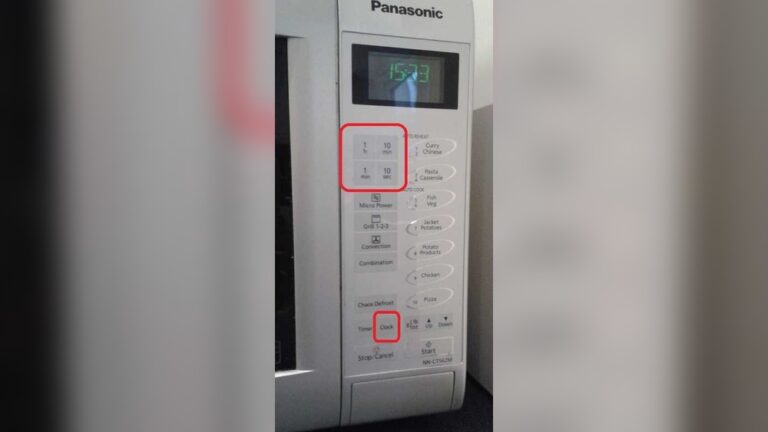
Touch Panel Models
Touch panel microwaves use a smooth screen instead of physical buttons. The lock activates to prevent accidental use, especially around children.
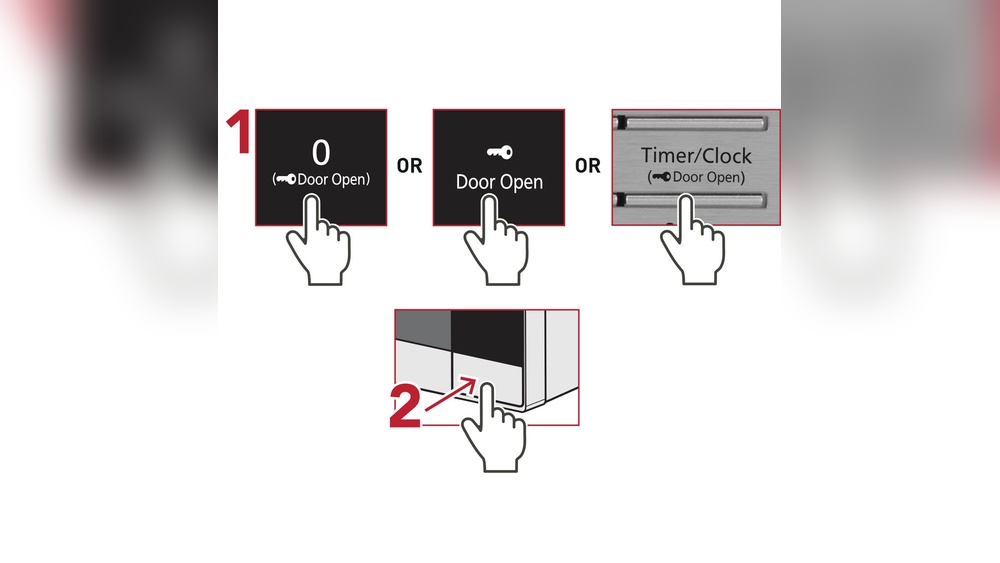
To unlock, press the Stop/Reset button three times quickly. This action clears the lock icon from the display.
Another method involves pressing Defrost, then Timer, and finally Popcorn in sequence. This combination toggles the lock on or off.
Make sure the control panel is dry and clean. Moisture or dirt can stop the touch sensors from working properly.
Button Sequence Tricks
Some Panasonic microwaves use button sequences to lock and unlock the device.
Try pressing the Start button three times fast to activate the lock. To unlock, press the Stop/Reset button three times quickly.
This simple trick works for many models with physical buttons. Clearing any ongoing settings before trying may help.
Always check your microwave’s manual for the exact sequence. Manuals provide model-specific instructions for safe use and unlocking.

Credit: www.youtube.com
Troubleshooting Unlock Issues
Sometimes your Panasonic microwave may not unlock as expected. Troubleshooting these issues helps restore normal use quickly. Follow simple steps to identify and fix common problems. This saves time and avoids frustration.
Check For Panel Obstructions
Make sure the control panel is clean and dry. Dirt, grease, or moisture can block the touch sensors. Wipe the panel gently with a soft cloth. Avoid using harsh chemicals that may damage the surface. Remove any objects that might press buttons accidentally. Clear the area around the panel for better response.
Reset Settings
Try resetting the microwave to clear any temporary errors. Unplug the microwave from the power outlet. Wait for about one minute before plugging it back in. This resets the system and may clear the lock mode. After resetting, test the buttons again. This simple step often solves minor lock issues.
Consult User Manual
Refer to your microwave’s user manual for model-specific instructions. The manual explains how to use the child safety lock feature. It also shows correct button combinations to lock or unlock the microwave. Manuals may include troubleshooting tips for your exact model. Keep the manual handy for quick reference in the future.
Using The Child Lock Feature
The child lock feature on a Panasonic microwave helps prevent accidental use. It keeps the microwave controls disabled. This feature is useful in homes with young children. Activating and deactivating the child lock is simple and quick. Follow the steps below to manage this safety feature easily.
Activating The Lock
Find the Stop/Reset button on the microwave control panel. Press this button three times quickly. Watch the display screen for a “LOCK” icon. This icon means the child lock is active. The microwave buttons will not respond until you unlock it. This prevents the microwave from starting by mistake.
Deactivating The Lock
To turn off the child lock, press the Stop/Reset button three times quickly again. The “LOCK” icon will disappear from the screen. Now, the microwave controls will work normally. You can use the microwave as usual. Make sure to keep the child lock on when children are near.

Credit: www.youtube.com
Preventing Future Lockouts
Preventing future lockouts on your Panasonic microwave helps avoid hassle and saves time. Simple habits and regular care keep your microwave working smoothly. A few easy steps stop accidental locking and maintain the microwave’s control panel responsiveness.
Tips For Avoiding Accidental Locking
Do not press buttons too fast or in a random order. This can trigger the lock feature unintentionally. Teach family members how to use the microwave properly. Avoid pressing the Stop or Reset button three times by mistake. Keep an eye on the control panel when using it. Always read the microwave’s manual for specific lock instructions.
Regular Maintenance Advice
Clean the control panel often using a soft, dry cloth. Avoid using too much water or harsh chemicals. Moisture or dirt can cause the touch panel to malfunction. Check the microwave door seal for damage and keep it clean. Inspect buttons for any sticking or damage regularly. Schedule a professional checkup if the microwave shows signs of frequent lockouts or errors.

Credit: shop.panasonic.com
Frequently Asked Questions
How Do I Get My Panasonic Microwave Out Of Lock Mode?
Press the Stop/Reset button three times quickly to unlock your Panasonic microwave. For touch models, press Start three times, then Stop/Reset three times. Clear settings and try Defrost > Timer > Popcorn to toggle lock. Consult your manual if it remains locked.
How Do You Get A Microwave Out Of Lock Mode?
Press the Stop/Reset button three times quickly to unlock most microwaves. For touch panels, press Start three times, then Stop/Reset three times. Clean the control panel if unresponsive. Check your manual for model-specific instructions.
How To Open A Microwave Door If Locked?
Press the Stop/Reset button three times quickly to unlock most Panasonic microwaves. For touch panels, press Start three times, then Stop/Reset three times. Ensure the control panel is clean and free from obstructions. Consult your microwave manual for model-specific unlocking instructions.
Conclusion
Unlocking your Panasonic microwave is simple with the right steps. Try pressing the Stop/Reset button three times quickly. Some models need a special button combo like Start and Stop presses. Keep the control panel clean to avoid sensor issues. Always check your user manual for model-specific instructions.
Following these tips helps you regain full microwave use fast. Enjoy hassle-free cooking once the lock is removed. Remember, patience and careful button pressing make the process easy. Your microwave will work like new again in no time.