How to Replace Charcoal Filter on Samsung Microwave: Easy Guide
If you’ve noticed your Samsung microwave isn’t clearing cooking odors as well as before, it might be time to replace the charcoal filter. This small but powerful part plays a big role in keeping your kitchen air fresh.
Replacing the charcoal filter might sound tricky, but with the right steps, you can do it yourself quickly and easily. In this guide, you’ll learn exactly how to find, remove, and install a new charcoal filter on your Samsung microwave.
Keep reading—your microwave and your kitchen air will thank you!
Charcoal Filter Role
The charcoal filter is an important part of a Samsung microwave. It helps clean the air inside your kitchen during cooking. The filter traps smoke, odors, and grease particles. This keeps the air fresh and prevents bad smells from spreading.
Without a working charcoal filter, your kitchen might fill with strong cooking odors. The filter also protects the microwave’s vent system. It stops grease buildup that can cause damage or reduce airflow. Knowing the filter’s role helps you keep your microwave in good shape.
Purpose In Microwaves
The charcoal filter cleans the air by absorbing odors and smoke. It uses activated charcoal to trap harmful particles. This filter works especially well in microwaves without an external vent. It recirculates clean air back into the kitchen.
This filter also helps reduce grease inside the microwave vents. It prevents grease from clogging the fan and other parts. By keeping the vents clean, the microwave runs more efficiently. The charcoal filter is a key part of this process.
Signs To Replace
You should replace the charcoal filter if cooking odors stay strong. A dirty or clogged filter loses its ability to absorb smells. Check for discoloration or dark stains on the filter surface. These signs mean the filter is full and needs changing.
Some Samsung microwaves have a filter replacement light. This light turns on to remind you to replace the filter. If your microwave shows this alert, replace the charcoal filter soon. Regular replacement keeps your microwave working well and your air fresh.

Credit: www.amazon.com
Tools Needed
Before starting the charcoal filter replacement on your Samsung microwave, gather all necessary tools. Having the right tools ensures a smooth, safe process. Preparation saves time and avoids frustration.
Most Samsung microwaves require only a few basic tools. These tools help you remove screws and access the filter area easily. Let’s explore the tools you will need.
Screwdriver Types
A Phillips head screwdriver is essential for this task. It fits the cross-shaped screws on the microwave vent cover. Choose a medium-sized screwdriver for better control.
Sometimes, a flat-head screwdriver might be useful to gently pry open the filter cover. Use it carefully to avoid damage. Having both types ready is smart.
Safety Precautions
Unplug the microwave before starting any work. This avoids electrical shocks and keeps you safe. Never work on the appliance while it is connected to power.
Wear gloves to protect your hands from sharp edges inside the vent. Work in a well-lit area to see screws and parts clearly. Take your time and avoid rushing.
Locating The Filter
Finding the charcoal filter in your Samsung microwave is the first step in replacing it. The filter plays a key role in trapping odors and grease while cooking. Knowing where it sits helps you remove it safely and easily. Most Samsung microwaves have the charcoal filter hidden behind a cover or vent. This section guides you to locate that filter quickly.
Common Filter Positions
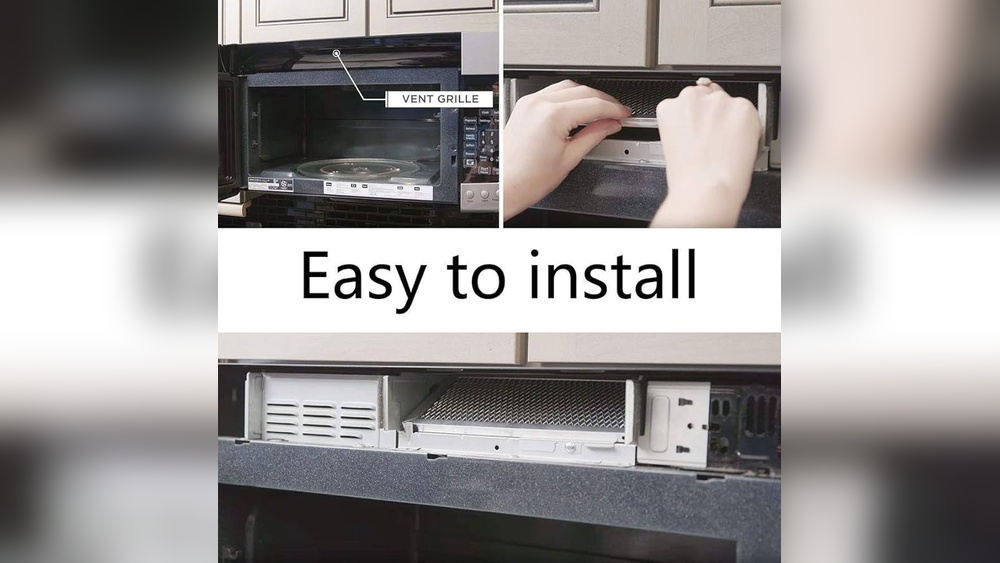
Samsung microwave charcoal filters usually sit above the cooking area. They often hide behind the vent grille on the top or inside the microwave’s exhaust vent. Some models place the filter behind the control panel or inside the microwave door frame. Check the user manual for your model to find the exact spot. Look for a vent cover with small screws or clips holding it in place.
Accessing The Filter Cover
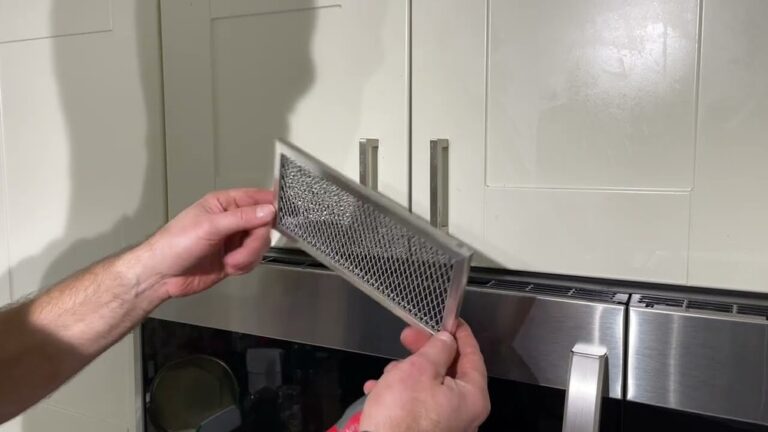
Use a Phillips head screwdriver to remove screws on the vent cover. The cover may slide forward or lift off once screws are removed. Be gentle to avoid breaking clips or damaging the cover. After removing the cover, you will see the charcoal filter. It usually slides out or lifts from its slot. Keep the screws safe for reassembly. Always unplug the microwave before starting this process for safety.

Credit: www.youtube.com
Removing Old Filter
Removing the old charcoal filter from your Samsung microwave is the first step to ensure fresh, clean air circulation. This process helps keep your microwave working efficiently and prevents odors. Follow these simple steps to remove the filter carefully and safely.
Unscrewing The Vent Grille
Start by locating the vent grille on your microwave. It usually sits above or below the microwave door. Use a Phillips head screwdriver to remove the screws holding the vent grille in place. Turn the screws counterclockwise until they come out completely. Place the screws somewhere safe to avoid losing them.
Taking Out The Filter
After removing the vent grille, you will see the charcoal filter inside. Gently pull the filter out from its slot. Sometimes, you may need to lift the filter slightly before pulling it out. Avoid using force to prevent damage to the microwave. Set the old filter aside for proper disposal.
Installing New Filter
Installing the new charcoal filter in your Samsung microwave is a simple step. It helps keep your kitchen air fresh by trapping odors and grease. Follow the instructions carefully to ensure the filter fits perfectly and works well.
Positioning The Replacement
Hold the new charcoal filter so the label faces outward. Align it with the slot in the microwave vent. Slide the filter gently into place, making sure it fits snugly. Avoid forcing the filter to prevent damage.
Securing The Vent Cover
Place the vent cover back over the filter opening. Line up the screw holes with the microwave frame. Use a Phillips screwdriver to tighten the screws securely. Check that the cover is stable and does not move.
Filter Maintenance Tips
Proper filter maintenance keeps your Samsung microwave working well. Filters trap grease, smoke, and odors during cooking. Regular care improves air quality and extends microwave life. Follow these tips to clean and replace filters correctly.
Cleaning Grease Filters
Grease filters catch oil and food particles. Clean them every month for best results. Remove the filter gently from the microwave. Wash it in warm, soapy water or use a mild detergent. Rinse well and let it dry before reinstalling. Avoid harsh chemicals or scrubbing hard. A clean grease filter keeps air flowing smoothly.
Replacement Frequency
Charcoal filters absorb odors and cannot be washed. Replace them every 6 to 12 months depending on use. Check for discoloration or strong smells as signs to change. Some Samsung models have a filter replacement light. Replace the filter promptly to maintain fresh air. Always use the correct replacement filter for your model.
Resetting Filter Indicator
The filter indicator on your Samsung microwave helps track the charcoal filter’s status. Resetting this indicator after replacing the filter keeps the microwave’s alerts accurate. It stops unnecessary warnings and ensures your microwave runs efficiently. This simple reset process requires no tools and takes only seconds.
When To Reset
Reset the filter indicator right after installing a new charcoal filter. The microwave uses this timer to remind you about filter maintenance. If you do not reset, the warning light may stay on. This can cause confusion about the filter’s actual condition. Resetting signals the microwave that the filter is fresh and clean.
Step-by-step Reset Guide
Start with the microwave door closed. Press and hold the “Stop/Cancel” button for about 3 seconds. The filter indicator light will turn off. This confirms the reset is complete. If the light stays on, try the process again. Your microwave is now ready to monitor the new filter’s lifespan.
Troubleshooting Issues
Troubleshooting common problems helps keep your Samsung microwave working well. Some issues may arise during charcoal filter replacement. Understanding these problems saves time and effort. The following tips address frequent troubles with filter fitting and odors.
Filter Not Fitting
Check the filter model number before installation. Samsung microwaves need specific charcoal filters. A wrong filter size causes poor fit and function. Remove the old filter carefully to avoid damage. Clean the filter slot to remove dust or debris. Align the new filter properly with the slots. Press gently but firmly to secure it in place. Avoid forcing the filter as it may break. Confirm that the filter sits flush with the microwave surface. If problems persist, verify the filter’s compatibility with your model.
Persistent Odors
Charcoal filters help reduce cooking smells inside the microwave. Persistent odors indicate the filter may be saturated or damaged. Replace the filter every six to twelve months for best results. Clean the microwave interior regularly to prevent odor buildup. Avoid using harsh cleaners that can harm the filter or microwave. Check for food spills or grease behind the filter area. Ensure proper ventilation during cooking to help the filter work. If odors remain after replacement, inspect the vent system for blockages or damage.

Credit: www.youtube.com
Frequently Asked Questions
Where Is The Charcoal Filter Located On A Samsung Microwave?
The charcoal filter sits behind the top vent grille on Samsung microwaves. Remove screws and lift the grille to access it.
Do I Need To Replace My Microwave Charcoal Filter?
Replace your microwave charcoal filter every 6 to 12 months or when it looks dirty or discolored. Regular replacement ensures proper air filtration and odor control. Check your microwave’s filter replacement indicator light for timely alerts.
Where Is The Microwave Charcoal Filter Located?
The microwave charcoal filter is located behind the top vent grille. Remove vent screws with a Phillips screwdriver to access it.
Conclusion
Replacing the charcoal filter in your Samsung microwave keeps it working well. Clean air helps your microwave last longer and cook better. Check the filter every six to twelve months for dirt or damage. Use a screwdriver to remove and install the filter easily.
Follow these simple steps to keep your kitchen fresh and your microwave safe. Regular care saves money and avoids bad smells. Stay on top of filter changes for a smooth cooking experience.