How to Install a Charcoal Filter in a Samsung Microwave: Easy Steps
If you’ve noticed lingering cooking smells in your kitchen or your Samsung microwave isn’t venting as effectively as before, it might be time to install a new charcoal filter. This small but powerful part traps odors and grease, keeping your kitchen air fresh and clean.
Installing a charcoal filter might sound tricky, but with the right steps, you can do it yourself quickly and easily. In this guide, you’ll learn exactly how to find, remove, and replace the charcoal filter in your Samsung microwave, so you can get back to cooking without worrying about unwanted smells.
Keep reading to make your microwave work like new again!
Tools And Materials Needed
Before installing a charcoal filter in your Samsung microwave, gather all necessary tools and materials. Having everything ready makes the process smooth and faster. It helps avoid interruptions and ensures proper installation.
Essential Tools
You need a few basic tools to install the charcoal filter. A screwdriver is the most important tool. Most Samsung microwaves require a Phillips-head screwdriver. Sometimes, a flat-head screwdriver might also be helpful for prying open parts carefully.
Keep a flashlight nearby to see inside the filter compartment clearly. Gloves can protect your hands from sharp edges inside the microwave. A soft cloth helps clean any dust or dirt before installing the new filter.
Materials Required
First, ensure you have the correct charcoal filter for your Samsung microwave model. Check the model number on the microwave or in the user manual. Using the wrong filter can reduce efficiency and cause odors.
Besides the filter, keep the mounting screws ready if the old ones are damaged or missing. A small container can hold the screws safely during installation. Avoid touching the filter surface directly; oils from your skin can reduce its effectiveness.
Locating The Charcoal Filter
Locating the charcoal filter in your Samsung microwave is the first step to replace or install it properly. Knowing where the filter is helps you maintain your microwave’s air quality and remove odors efficiently. The charcoal filter usually sits in a specific compartment designed for easy access and replacement.
Finding this compartment depends on your microwave model and its design. Some models have the filter behind a grille, while others hide it under the vent or inside the microwave. Identifying the exact location ensures a smooth installation process without damage.
Checking Your Microwave Model
Start by checking your microwave’s model number. It is usually found inside the door or on the back of the unit. Write it down for reference.
Use this model number to find your microwave’s manual online. The manual shows the charcoal filter’s location and replacement instructions. If you don’t have the manual, Samsung’s official website offers downloadable versions.
Knowing your model helps you understand whether your microwave uses a charcoal filter and its placement.
Accessing The Filter Compartment
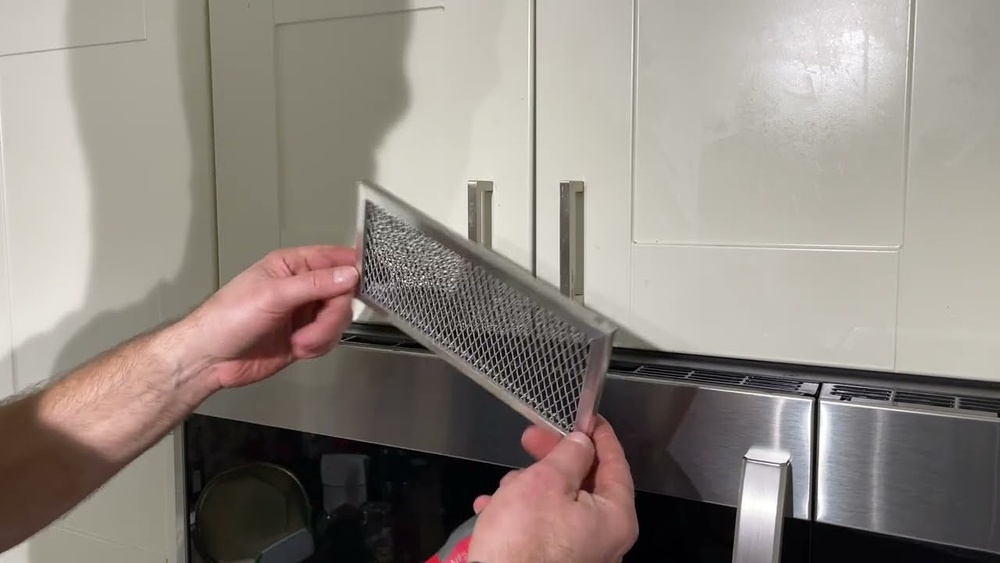
Most Samsung microwaves have the charcoal filter behind the vent grille on the top or side of the microwave. You may need a screwdriver to remove the grille cover.
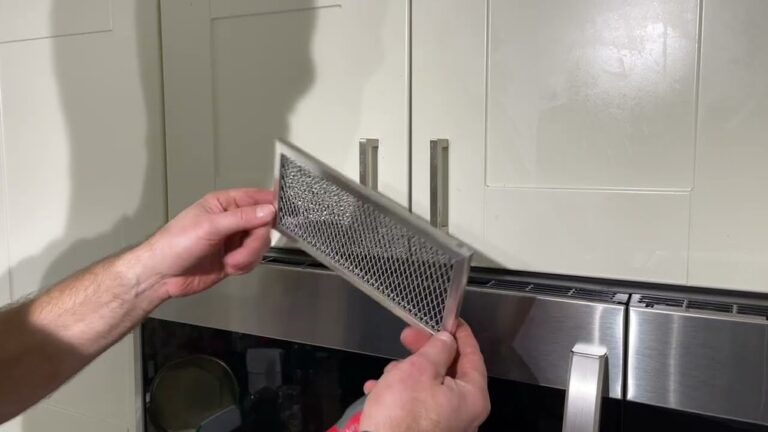
Carefully pull off the grille or open the filter door. This reveals the charcoal filter slot. Some filters slide out, while others may clip in place.
Remove the old filter gently. Note its position and orientation before installing the new one. Proper access makes replacement quick and safe.
Removing The Old Filter
Removing the old charcoal filter from your Samsung microwave is the first step before installing a new one. This process keeps your microwave working efficiently and helps maintain clean air in your kitchen. Handle the filter carefully to avoid damage.
Opening The Filter Cover
Locate the filter cover on the microwave’s vent area. It usually has a small latch or clip. Gently press or slide this latch to unlock the cover. Slowly pull the cover away to reveal the charcoal filter inside. Avoid using too much force to prevent breaking the cover.
Taking Out The Used Filter
Once the cover is open, grasp the edge of the old charcoal filter. Carefully pull it straight out from its slot. The filter may feel a bit stuck if it has been inside for a long time. Wiggle it slightly but do not use sharp tools. Dispose of the used filter properly as it contains trapped odors and grease.

Credit: www.amazon.com
Installing The New Filter
Installing the new charcoal filter in your Samsung microwave keeps the air fresh. It stops cooking odors from spreading in your kitchen. Follow these steps carefully to place and secure the filter properly. This ensures your microwave works well and lasts longer.
Positioning The Charcoal Filter
Open the microwave’s filter compartment door. Take the new charcoal filter out of its packaging. Align the filter so the tabs match the slots inside the compartment. Place the filter gently inside, making sure it fits flat. The filter should sit snugly without any gaps.
Securing The Filter In Place
Push the filter firmly into the compartment. You may hear a soft click when it locks. Check that the filter does not move or fall out. Close the filter compartment door securely. Tighten any screws or clips to hold the door in place. This keeps the filter stable during microwave use.
Final Checks
After installing the charcoal filter in your Samsung microwave, complete final checks. These steps ensure the filter works correctly and fits securely. Proper installation helps your microwave remove odors effectively and keeps your kitchen air fresh.
Ensuring Proper Fit
Check that the charcoal filter sits firmly in its compartment. It should not move or wobble when touched. A tight fit prevents air from bypassing the filter. Look for any gaps or loose edges around the filter. Adjust the filter gently if needed until it fits snugly. This step is key for the filter to perform well.
Replacing The Filter Cover
Place the filter cover back over the charcoal filter carefully. Align the cover with the slots or clips on the microwave. Press the cover until you hear a click or feel it lock into place. Make sure the cover is secure and does not fall off easily. A properly sealed cover keeps the filter stable and protects it from damage.

Credit: www.samsung.com
When To Replace The Filter
Knowing when to replace the charcoal filter in your Samsung microwave keeps your kitchen fresh. The filter traps odors and grease during cooking. Over time, it loses its ability to clean the air properly. Replacing it on time avoids bad smells and keeps your microwave working well.
Signs Of A Worn-out Filter
You may notice strong cooking odors that don’t go away. The microwave might release smoke or a burnt smell. The filter can look dirty or clogged. If air flow feels weak or uneven, the filter may be blocked. These signs mean the filter needs changing soon.
Recommended Replacement Schedule
Samsung suggests replacing the charcoal filter every 6 to 12 months. This depends on how often you cook and the type of food. Heavy use means replacing it closer to 6 months. Light use can allow up to a year before change. Always check your microwave’s manual for exact advice.
Tips For Maintaining Your Microwave Filter
Maintaining your microwave filter helps keep your appliance working well and your kitchen fresh. Regular care prevents odors and grease build-up. Small efforts extend the life of your charcoal filter. Follow these simple tips to maintain your Samsung microwave filter efficiently.
Avoiding Grease Build-up
Grease can clog the charcoal filter quickly. Wipe your microwave’s vent area after cooking. Clean spills and splatters immediately. Use a mild detergent and warm water for cleaning. Avoid harsh chemicals that may damage the filter. Regular cleaning keeps grease from settling inside the filter.
Using The Microwave Vent Properly
Turn on the microwave vent every time you cook. This helps trap smoke and odors before they spread. Use the vent on the correct setting for the food type. Avoid blocking the vent with kitchen items. Proper vent use helps the charcoal filter work at its best.

Credit: www.youtube.com
Frequently Asked Questions
Where Does The Charcoal Filter Go In The Samsung Microwave?
Place the charcoal filter in the microwave’s filter compartment, usually behind the grille or vent panel. Push until it snaps securely.
How To Replace A Charcoal Filter In A Microwave?
Open the microwave’s filter door. Remove the old charcoal filter carefully. Insert the new filter snugly. Close the door securely. Replace any screws if needed. Replace the filter every 6 months or when odors persist. Use the correct model filter for best results.
Which Way Does The Charcoal Filter Go?
Insert the charcoal filter with the tabs aligned. Push the top until it snaps securely in place. Ensure it fits snugly in the compartment.
Conclusion
Installing a charcoal filter in your Samsung microwave keeps your kitchen air fresh. The process is simple and quick with basic steps. Regular replacement ensures the filter works well and removes odors. Clean air improves your cooking experience every day.
Follow the guide carefully for best results. Now your microwave can vent clean, odor-free air efficiently. Stay on top of maintenance to avoid lingering smells. Enjoy a fresher kitchen with a properly installed charcoal filter.