How to Install Charcoal Filter in Samsung Microwave: Easy Step-by-Step Guide
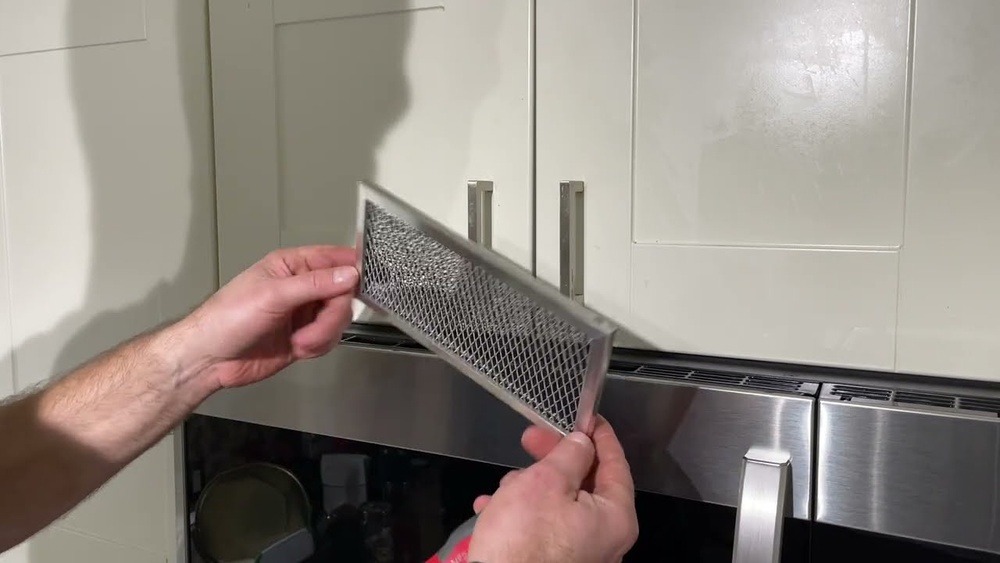
If you own a Samsung microwave that vents air back into your kitchen, the charcoal filter inside plays a crucial role in keeping your cooking space fresh and odor-free. Over time, this filter can get clogged with grease and smells, reducing its effectiveness.
Installing a new charcoal filter might sound tricky, but with the right steps, you can do it yourself quickly and easily. In this guide, you’ll learn exactly how to install a charcoal filter in your Samsung microwave, so your kitchen stays clean and your microwave works efficiently.
Keep reading to discover the simple tricks that will save you time and money!
Charcoal Filter Purpose
The charcoal filter in a Samsung microwave plays a key role in keeping your kitchen air clean. It helps reduce smells and traps grease from cooking. This filter is essential for microwaves that recirculate air instead of venting outside. Understanding its purpose helps you know why regular replacement matters.
Role In Air Recirculation
The charcoal filter cleans the air before it returns to your kitchen. It captures particles and freshens the air. This process stops smoke and odors from spreading. Without this filter, air would carry strong cooking smells and grease. It supports a healthier and more pleasant kitchen environment.
Odor And Grease Absorption
The filter absorbs cooking odors quickly. It traps grease and small food particles in its charcoal layer. This keeps your microwave and kitchen cleaner. The filter prevents grease build-up inside the microwave vents. Clean air improves the overall kitchen smell and reduces cleaning effort.

Credit: www.samsung.com
Identifying Filter Location
Finding the charcoal filter location in your Samsung microwave is the first step to a proper installation. Knowing where the filter sits helps you replace it quickly. Charcoal filters trap odors and grease from cooking. This keeps your kitchen air fresh and clean. Most Samsung microwaves have a simple design to access the filter.
Common Filter Placement
Most Samsung microwaves place the charcoal filter behind the vent grille. This grille usually sits on the top or the bottom front of the microwave. In some models, the filter is inside a small compartment near the fan. The filter is often rectangular or square. It fits snugly in its slot to work correctly. Check your microwave’s manual to confirm the exact location.
Accessing The Filter Compartment
Start by unplugging the microwave for safety. Next, remove the vent grille by gently pulling or unscrewing it. Some models have clips holding the grille in place. Use a screwdriver if needed to remove screws. Once the grille is off, you will see the filter. Pull the old filter straight out carefully. Avoid bending or damaging it. Now the compartment is ready for the new charcoal filter installation.
Signs To Replace Filter
Knowing when to replace the charcoal filter in your Samsung microwave is important. The filter helps remove odors and grease from the air. Over time, it loses its ability to work properly. Watch for clear signs that the filter needs changing. This keeps your microwave clean and your kitchen fresh.
Persistent Odors
Strong smells that stay after cooking show the filter is not working. The charcoal inside may be full and cannot absorb odors. If your kitchen smells smoky or musty, it is time to replace the filter.
Greasy Or Shiny Surface
A greasy or shiny filter surface means it has trapped too much oil. The filter clogs and cannot clean the air well. This buildup blocks airflow and reduces microwave efficiency. Replace the filter to prevent damage and keep air fresh.
Visible Clogging
Look closely at the filter for dirt or dust buildup. A clogged filter looks dark and thick with debris. This stops air from passing through properly. When you see visible clogging, change the filter right away.
Choosing The Right Filter
Choosing the right charcoal filter for your Samsung microwave is essential. The correct filter ensures clean air and removes odors effectively. A wrong filter might not fit well or work properly. Knowing your microwave model helps find the perfect match. This section guides you on selecting the proper filter for your needs.
Model-specific Filters
Samsung microwaves use different charcoal filters depending on the model. Each filter fits a specific microwave design and size. Check your microwave’s model number before buying a filter. The model number is usually on the microwave’s inside door or back panel. Using the exact filter prevents installation problems and ensures good air filtration. Avoid generic filters as they may not work well with your unit.
Where To Buy
Buy charcoal filters from trusted sellers for quality assurance. Official Samsung stores and authorized dealers offer genuine parts. Online retailers like Amazon and appliance part websites also sell filters. Compare prices and check reviews before purchasing. Avoid cheap, low-quality filters that may wear out quickly. Keep your microwave’s model number ready to find the correct filter easily.
Removing Old Filter
Removing the old charcoal filter is the first step to keep your Samsung microwave working well. The filter traps odors and grease, so changing it often is important. This process is simple and takes only a few minutes. Follow these clear steps to remove the old filter safely and easily.
Opening Filter Door
Locate the filter door on your microwave’s underside or front grille. Use your fingers or a flat tool to gently open the door. Some models have a small latch or button to release it. Open the door fully to access the filter compartment. Be careful not to damage the door or surrounding parts.
Detaching The Old Filter
Once the door is open, look at how the filter is fixed. Most filters snap or slide into place. Press the tabs or gently pull the filter forward to release it. If it feels stuck, wiggle it slightly without using too much force. Take the old filter out and dispose of it properly. Now, the space is ready for the new charcoal filter.
Installing New Filter
Installing a new charcoal filter in your Samsung microwave is simple and quick. This step is important to keep your microwave working well and your kitchen smelling fresh. Follow the steps carefully to fit the filter correctly.
Correct Filter Orientation
Check the new charcoal filter for arrows or marks. These marks show the correct direction to insert the filter. The filter should fit snugly without forcing it. Place the filter so the side with the carbon material faces inside the microwave vent. This position helps trap odors and grease effectively. Align the filter carefully to avoid gaps or loose fitting.
Securing The Filter In Place
After positioning the filter, press it gently into the filter slot. Push the top edge until you hear a click or feel it snap into place. Make sure the filter does not move or fall out. Some models have a small latch or screws to hold the filter securely. Tighten screws if needed, but avoid overtightening to prevent damage. The filter should stay firmly in place during microwave use.
Maintaining Your Filter

Maintaining your charcoal filter keeps your Samsung microwave working well. The filter traps odors and grease during cooking. Clean and replace it regularly to ensure fresh air and better performance.
Replacement Frequency
Change the charcoal filter every six months. Cooking often or strong smells may need faster replacement. A clogged filter reduces airflow and odor removal. Check your microwave manual for exact timing.
Replace the filter sooner if you notice bad smells or smoke. A fresh filter keeps your kitchen air clean and your microwave efficient.
Cleaning Other Microwave Filters
Besides the charcoal filter, your microwave may have a grease filter. Clean the grease filter monthly to avoid buildup. Remove it gently and wash with warm, soapy water. Let it dry completely before reinstalling.
Do not clean the charcoal filter with water. Water damages its odor-absorbing material. Only replace the charcoal filter when needed.
Credit: www.youtube.com

Credit: www.amazon.com
Frequently Asked Questions
Where Does The Charcoal Filter Go In The Samsung Microwave?
The charcoal filter fits inside the microwave’s vent grille or filter compartment. Open the grille, remove the old filter, and snap the new one in place. Secure it with mounting screws if needed. Ensure the filter fits snugly for proper odor and grease absorption.
How To Install A Charcoal Filter In A Microwave?
Open the microwave’s filter compartment. Remove the old charcoal filter carefully. Insert the new filter snugly with tabs aligned. Push until it snaps into place. Secure with mounting screws if required. Ensure the filter fits tightly to prevent odors and grease buildup.
Which Way Does The Charcoal Filter Go?
Insert the charcoal filter with the tabs facing up. Angle the front edge down until it fits snugly in the compartment. Push firmly until it snaps into place.
Conclusion
Installing the charcoal filter in your Samsung microwave is simple and quick. Follow the steps carefully to ensure the filter fits well. A properly installed filter helps reduce odors and keeps your kitchen air fresh. Change the filter regularly for best results.
This small task improves your microwave’s performance and your cooking experience. Keep your microwave clean and enjoy odor-free meals every day.