How to Use a Samsung Microwave Oven: Easy Tips for Perfect Cooking
If you’ve just got your Samsung microwave oven or want to make the most out of it, you’re in the right place. Using your microwave doesn’t have to be confusing or time-consuming.
Whether you want to heat leftovers quickly, defrost frozen meals, or try out one of the smart cooking presets, this guide will walk you through every step. You’ll learn how to use your Samsung microwave oven easily and safely, unlocking its full potential to save you time and bring convenience to your kitchen.
Ready to become a microwave pro? Let’s dive in!
Samsung Microwave Basics
Understanding the basics of your Samsung microwave oven helps you use it safely and effectively. This section covers the main parts, control panel, and safety features. Knowing these helps you get started quickly.
Microwave Components
The main parts of a Samsung microwave include the door, turntable, and interior light. The door seals the microwave to keep energy inside. The turntable rotates food for even cooking. The interior light lets you see the food while heating.
Other components are the magnetron, which produces microwaves, and the fan that cools the oven. The control panel is outside the door and lets you set time and power. Each part works together for fast and safe cooking.
Control Panel Overview
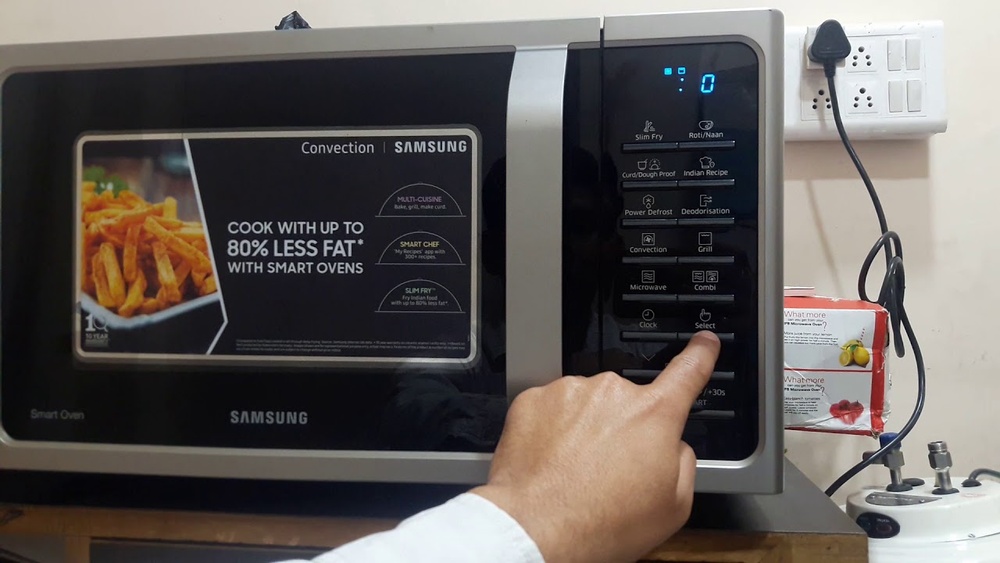
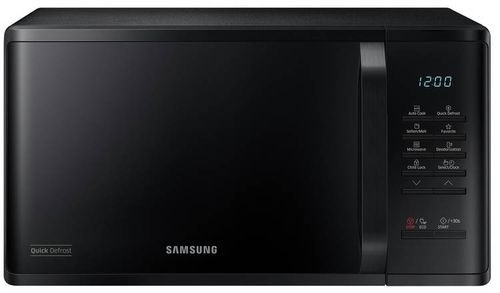
The control panel shows buttons and a display screen. You use these to enter cooking time and power level. Common buttons include Start, Stop, and Timer.
Samsung microwaves often have preset buttons for popcorn, beverages, and frozen food. These presets simplify cooking. The display shows the time and countdown during cooking. Easy to read and use.
Safety Features
Samsung microwaves have safety locks to prevent accidental use. The door has a latch that stops the microwave if opened during cooking. This protects you from microwave radiation.
Some models include child lock features. This stops children from starting the microwave by mistake. Also, the microwave has an automatic shutoff if it overheats. These features keep your kitchen safe.
Credit: www.samsung.com
Setting Up Your Microwave
Setting up your Samsung microwave oven is the first step to enjoy quick and easy cooking. Follow simple steps to make sure your microwave works perfectly. Proper setup saves time and avoids common issues.
Check each step carefully before using your microwave for cooking or reheating food.
Power Connection
Place the microwave near a power outlet. Use a grounded outlet to avoid electrical problems. Plug the power cord fully into the socket. Avoid using extension cords as they can cause power loss. Make sure the microwave door closes completely before turning it on.
Initial Settings
Turn on the microwave by pressing the power button. Some models show a welcome message or beep sound. Select your preferred language if prompted. Adjust the sound settings for button tones if your model allows it. Read the user manual to understand special initial options for your microwave model.
Clock And Timer Setup
Set the clock by pressing the clock or time button. Use the number pad to enter the current time. Confirm the time by pressing start or clock again. For the timer, press the timer button, enter desired time, and start it. The timer helps track cooking without starting the microwave heating function.
Cooking Modes
Samsung microwave ovens offer a variety of cooking modes to suit different food types and cooking needs. These modes simplify cooking by using preset times and power levels. Each mode helps you prepare meals quickly and evenly without much guesswork. Understanding these modes ensures better results and saves time in the kitchen.
Auto Cook Functions
Auto Cook functions provide preset menus for common dishes. You select the type of food, and the microwave adjusts cooking time and power automatically. This mode works well for popcorn, vegetables, and reheating leftovers. It makes cooking easy, especially for beginners.
Sensor Cook Options
Sensor Cook uses built-in sensors to detect moisture and temperature. The microwave adjusts cooking time based on the food’s condition. This prevents overcooking or undercooking. It is useful for foods like rice, pasta, and frozen meals.
Speed Cook Mode
Speed Cook mode combines microwave power with convection or grilling elements. It cooks food faster while giving a crispy or browned finish. Use this mode for roasting chicken, baking, or grilling small items. It saves time and improves texture.
Timed Cooking
Timed Cooking lets you set the exact cooking duration. You enter the time and power level manually. This mode is perfect for recipes that need precise timing. It offers full control over the cooking process.
Adjusting Power Levels
Samsung microwaves allow you to change power levels to suit different foods. Lower power is good for gentle cooking or defrosting. Higher power is ideal for quick heating. Adjust power levels to avoid burning or uneven cooking.

Credit: www.youtube.com
Using Accessories
Using accessories with your Samsung microwave oven can improve cooking results and keep your food safe. Accessories help heat food evenly and prevent splatters. Knowing how to use them properly protects the microwave and your cookware.
Compatible Cookware
Only use microwave-safe cookware. Glass, ceramic, and some plastics work well. Avoid metal containers as they cause sparks. Choose containers labeled “microwave safe” for best results. Thin plastics or paper plates may melt or catch fire. Always check the manufacturer’s guide for recommended cookware.
Using Microwave Covers
Microwave covers keep food moist and stop splatters. Use plastic or silicone covers made for microwaves. Covers help food cook evenly by trapping steam. Avoid tight lids that block steam release. Clean covers after each use to prevent odors and stains.
Safe Use Of Trays And Racks
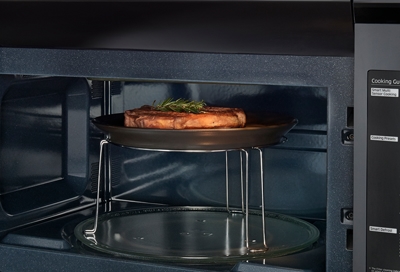
Trays and racks in Samsung microwaves allow multi-level cooking. Only use racks supplied with your microwave. Place food evenly on the rack for uniform heating. Do not use metal trays not designed for microwaves. Always follow safety instructions to avoid damage or sparks.
Defrosting And Reheating
Defrosting and reheating food in your Samsung microwave oven saves time and keeps meals fresh. The microwave offers automatic and manual defrost options for different food types. Reheating food is simple and helps maintain taste and texture. Follow these tips for best results and safe cooking.
Auto Defrost Settings
Samsung microwaves have preset auto defrost modes for meat, poultry, and fish. Enter the weight of your food, and the microwave calculates the defrost time. This setting gently thaws food without cooking the edges. Use the auto defrost button for quick and even thawing.
Manual Defrost Tips
Manual defrost lets you set the time and power level yourself. Use 30% power to avoid cooking food during defrosting. Pause the microwave to turn or separate food pieces for even thawing. Check food often to prevent overheating or partial cooking.
Reheat Guidelines
Place food in a microwave-safe container for reheating. Cover it with a microwave-safe lid or wrap to keep moisture in. Use medium or high power depending on food type and quantity. Stir or rotate food halfway through reheating to warm evenly. Let the food stand a minute before serving.
Credit: www.samsung.com
Advanced Features
Samsung microwave ovens come with advanced features that make cooking easier and faster. These features help you prepare food with better taste and safety. Understanding these options can improve your cooking experience.
Fry Mode Usage
The fry mode cooks food with less oil than a traditional fryer. It uses hot air to make food crispy and golden. Place the food on the grill rack inside the microwave. Set the fry mode and adjust the time according to the recipe. This mode is great for fries, chicken, and snacks.
Deodorization Function
This function removes strong smells from the microwave cavity. It works by heating the microwave without food inside. Activate the deodorization function after cooking foods like fish or garlic. It helps keep the microwave fresh and clean for the next use.
Child Lock Activation
The child lock keeps the microwave safe from accidental use. Activate it by pressing and holding specific buttons shown in the manual. The microwave buttons will lock, preventing children from starting it. Deactivate the lock the same way when you want to use the microwave again.
Maintenance And Cleaning
Keeping your Samsung microwave oven clean and well-maintained helps it work better and last longer. Dirt and food spills can build up inside and outside the microwave. Regular care stops bad smells and keeps the appliance safe to use. Follow simple steps to maintain your microwave easily.
Regular Cleaning Tips
Unplug the microwave before cleaning. Use a soft cloth with warm, soapy water to wipe the inside. Avoid harsh chemicals that can damage surfaces. Clean the turntable and remove any food crumbs. Wipe the outside, including buttons and handles. Dry all parts well before plugging the microwave back in.
Dealing With Odors
Bad smells come from leftover food or spills. Heat a bowl of water with lemon slices for five minutes inside. The steam will loosen odors and make cleaning easier. Wipe the inside after steaming. Baking soda can also absorb smells. Place a small open container of baking soda inside when not in use.
Checking Door And Seals
Check the microwave door and seals often. Make sure the door closes tightly and the seal is clean. Wipe the seals gently with a damp cloth. Damaged seals can cause heat to escape and make the microwave unsafe. Replace worn or broken seals quickly to keep your microwave working well.
Troubleshooting Common Issues
Troubleshooting common issues in your Samsung microwave oven saves time and stress. Problems can occur during use. Simple fixes often solve these problems without expert help.
Understanding common issues helps keep your microwave working well. The following sections cover typical problems and clear solutions.
Microwave Not Starting
Check if the microwave is plugged in properly. Ensure the door is fully closed. The microwave will not start if the door latch is not secure. Reset the circuit breaker if there is no power. Sometimes, a simple reset fixes the issue quickly.
Uneven Cooking
Uneven cooking often happens if the turntable is not rotating. Make sure the turntable is placed correctly. Use microwave-safe containers for best results. Stir food halfway through cooking to improve heat distribution. Adjust the power level to cook food more evenly.
Unusual Noises
Strange noises may come from the turntable or magnetron. Check if the turntable tray is clean and seated properly. Remove any food debris under the tray. If noises continue, stop using the microwave and call for service. Using the microwave with mechanical issues can cause damage.
Display Errors
Display errors can occur due to power surges or faults. Reset the microwave by unplugging it for a few minutes. Plug it back in and check the display. If errors persist, consult the user manual for error codes. Contact Samsung support for advanced troubleshooting.
Frequently Asked Questions
How To Get A Samsung Microwave To Work?
Plug in the Samsung microwave and close the door securely. Press the desired cooking button or enter time manually. Start the microwave by pressing “Start. ” Adjust power levels or use preset modes for specific cooking needs. Ensure the door latch works and the microwave has power.
How To Use A Microwave Step By Step?
Place food inside the microwave. Close the door securely. Set cooking time and power level. Press Start to begin. Wait until it beeps, then remove food carefully.
How To Heat Food Using Samsung Microwave?
Place food in a microwave-safe container. Close the door securely. Select the desired power level and time. Press Start. Monitor heating and stir if needed. Remove food carefully when done.
Conclusion
Using a Samsung microwave oven is simple and saves time. Just place your food inside, close the door firmly, and select the right cooking mode. Adjust power and time as needed for best results. Remember to use microwave-safe containers only.
Regular cleaning keeps your microwave working well. With these easy steps, you can enjoy quick and tasty meals every day. Practice a few times, and cooking will feel natural and fast. Keep this guide handy for quick reference anytime you need it.