How to Turn off Child Lock on Panasonic Microwave: Quick Guide
Is your Panasonic microwave stuck in child lock mode, leaving you frustrated and unable to use it freely? You’re not alone.
Many users accidentally activate this handy safety feature and then struggle to turn it off. But don’t worry—unlocking your microwave is easier than you think. In this guide, you’ll discover simple, step-by-step methods to quickly disable the child lock on your Panasonic microwave.
Whether you have a touch panel model or a classic control setup, you’ll regain full control of your microwave in no time. Keep reading to unlock your microwave and get back to cooking without any hassle!
Credit: help.na.panasonic.com
Child Lock Basics
Understanding the child lock feature on your Panasonic microwave is important. It helps keep the microwave safe around children. This feature stops accidental use or changes to cooking settings.
Before turning off the child lock, know what it does and why it is helpful. This knowledge makes it easier to use your microwave safely and correctly.
What Child Lock Does
The child lock stops all button functions on the microwave. It prevents the door from opening or the microwave from starting. This keeps children from running the microwave alone.
When the lock is active, the control panel does not respond. This avoids accidental cooking or harmful situations. It also protects the microwave from unwanted changes during use.
Why It’s Useful
Child lock adds safety to your kitchen. Children often explore and press buttons without knowing the risks. The lock stops them from turning on the microwave by mistake.
This feature also helps avoid food spills and damage. It keeps the microwave working well and your family safe. Parents can relax knowing the microwave is secure.
Quick Unlock Methods
Quick unlock methods provide fast ways to disable the child lock on Panasonic microwaves. These tricks work on many models and require no special tools. They help you start using the microwave without delay. Here are two simple ways to try.
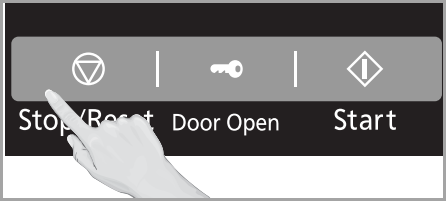
Triple Tap Stop/reset
Press the Stop/Reset button three times fast. Do it in one smooth motion without pauses. This action often disables the child lock immediately. The microwave should beep or show a message confirming the unlock. This method works on many Panasonic models with a physical Stop/Reset button. Try it before trying more complex steps.
Using Popcorn Button Sequence
Press the Turbo Defrost or Auto Defrost button first. Next, press the Timer button. Then press the Popcorn button last. This button sequence can deactivate the child lock on some touch panel models. Wait a few seconds after pressing the buttons. The microwave display should show that the lock is off. This method suits newer Panasonic microwaves with a digital control panel.
Model-specific Tips
Different Panasonic microwave models have unique ways to disable the child lock. Understanding these model-specific tips helps you unlock the microwave quickly. This section covers common methods used in various models. Follow these easy steps to turn off the child lock for your specific Panasonic microwave.
Touch Panel Unlock Codes
Many Panasonic microwaves use touch panel codes to disable the child lock. Try pressing the Turbo Defrost or Auto Defrost button first. Then, press the Timer button followed by the Popcorn button. This sequence often turns off the lock.
Some models need a quick triple press of the Stop/Reset button. Press it three times in a row to unlock the control panel. This method works for many models with touch controls.
Timer And Defrost Button Tricks
Other Panasonic microwaves use a combination of the Timer and Defrost buttons. Hold the Timer button for 3 to 5 seconds. Then press the Defrost button once. This action should disable the child lock feature.
If this does not work, try pressing and holding both buttons at the same time for a few seconds. This method works for some older or basic models. Always check the microwave display for any message or change.

Credit: www.youtube.com
Troubleshooting Lock Issues
Child lock issues on Panasonic microwaves can cause frustration. Sometimes, the lock does not deactivate as expected. Troubleshooting these problems helps restore normal microwave use quickly. This section covers simple steps to fix lock issues effectively.
Power Cycle Microwave
Unplug the microwave from the power outlet. Wait for about one minute. This pause resets the microwave’s internal system. Plug the microwave back in and check if the lock is off. Power cycling often clears minor errors causing the lock to stay active.
Check For Auto-lock Features
Some Panasonic models have an auto-lock function. This feature activates the lock after a set time. Check the microwave manual for auto-lock settings. Press the Timer or Clock button to view lock status. Disable auto-lock if it keeps the child lock active. Knowing this feature prevents confusion over the lock behavior.
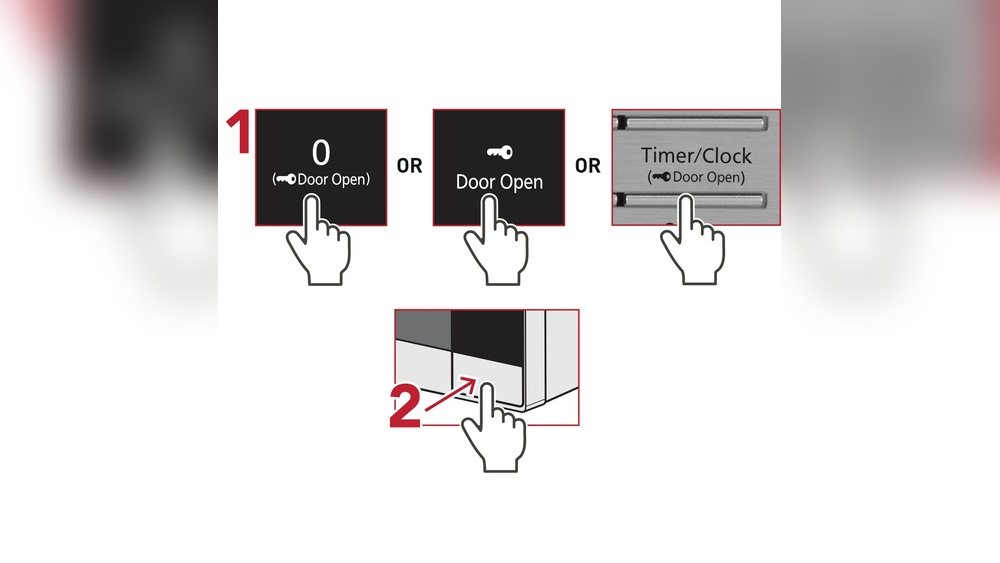
Manual Door Release
The manual door release on a Panasonic microwave provides a way to open the door when the child lock or electronic lock fails. This feature is especially useful during power outages or when the microwave’s automatic unlocking does not work.
Using the manual release ensures safety and convenience without damaging the appliance. It acts as a backup method to regain access to the microwave’s interior.
When To Use Manual Override
Use the manual override if the microwave door stays locked due to a child lock or power failure. It helps when the control panel is unresponsive or frozen. The manual release should be your choice if you cannot unlock the door with normal button presses.
Avoid forcing the door open to prevent damage. The manual release is safe and designed for emergencies or malfunctions.
Step-by-step Manual Release Guide
Locate the manual door release lever or button. This is usually inside the microwave’s door frame or near the latch mechanism. Refer to your microwave’s user manual for the exact location.
Press or slide the manual release gently. This action will disengage the door lock. Open the microwave door carefully once the lock is released.
After opening, reset the child lock by following the normal unlocking procedure on your microwave’s control panel. This will prevent the door from locking unexpectedly again.
Preventing Accidental Lock
Preventing accidental lock on your Panasonic microwave saves time and frustration. The child lock feature protects children but can activate unintentionally. Avoiding this helps you use the microwave smoothly every day.
Lock Activation Tips
Learn how to activate the child lock correctly. Press and hold the designated button, usually “Stop/Reset,” for three seconds. Avoid pressing random buttons together. This prevents accidental locking during cooking or cleaning.
Check your microwave’s manual for exact instructions. Different models may have slight variations. Confirm the lock status by looking for a lock icon on the display.
Avoiding Common Mistakes
Do not press buttons too quickly or in the wrong order. This can trigger the lock without meaning to. Avoid touching the control panel with wet or dirty hands, as this might cause false inputs.
Do not place heavy objects on the control panel. This can press buttons unintentionally. Keep the microwave clean and dry to reduce accidental activations. Regularly inspect buttons for wear or damage.

Credit: shop.panasonic.com
Frequently Asked Questions
How Do I Turn Off Child Lock On Panasonic Microwave?
Press the Stop/Reset button three times quickly to turn off the Child Lock on your Panasonic microwave. The “LOCK” icon will disappear, unlocking the microwave instantly.
How Do I Turn Off The Child Lock On My Microwave?
Press the Stop/Reset button three times quickly to turn off the child lock on your microwave. The lock icon will disappear.
How Do I Unlock My Panasonic Microwave?
To unlock your Panasonic microwave, press the Stop/Reset button three times quickly. The lock icon will disappear, allowing door use. Some models require pressing Turbo Defrost, Timer, then Popcorn buttons. If locked, unplug the microwave, wait, then plug it back in to reset.
Conclusion
Turning off the child lock on your Panasonic microwave is simple and quick. Most models use a button sequence like triple-tapping Stop/Reset or pressing Popcorn after Timer. If the lock stays on, try unplugging the microwave for a few minutes and plugging it back in.
Always check your microwave’s manual for model-specific instructions. With these steps, you can easily regain full control of your microwave. Safe and easy cooking awaits without the child lock hindrance. Keep this guide handy for any future need to disable the child lock.