How to Reset Panasonic Microwave: Easy Steps to Fix Your Device
Is your Panasonic microwave acting up or not working as it should? Before you rush out to buy a new one or call for expensive repairs, there’s a simple step you might be overlooking — resetting your microwave.
Resetting can clear errors, unlock controls, and restore normal function quickly and easily. In this guide, you’ll discover straightforward, step-by-step methods to reset your Panasonic microwave, whether it’s stuck in demo mode, not heating, or just behaving oddly. By the end, you’ll have the confidence to fix your microwave yourself and get back to cooking without hassle.
Keep reading to find out exactly how to reset your Panasonic microwave and solve common issues fast.
Credit: cookanyday.com
Reset Basics
Resetting a Panasonic microwave helps fix many common problems. It clears errors and restores normal function. Knowing the reset basics saves time and effort.
Simple resets work for most issues. Complex problems may need a factory reset. Below are easy methods to reset your microwave safely.
Using Stop/reset Button
Press the Stop/Reset button to clear current settings. This stops any active cooking program immediately. It also removes error messages on the display. Wait a few seconds after pressing before starting again.
Unplug And Replug
Unplug the microwave from the power outlet. Leave it unplugged for at least 30 seconds. This lets the internal circuits reset fully. Plug it back in and check if the problem is gone.
Factory Reset Steps
To do a factory reset, first unplug the microwave. Hold down the Stop/Reset button while plugging it in again. Keep holding the button for 10 seconds. Release the button and wait for the display to clear. The microwave now returns to original factory settings.
Disabling Demo Mode
Disabling Demo Mode on your Panasonic microwave is essential to return it to normal operation. Demo Mode is designed for store displays and prevents the microwave from heating food. Turning it off restores full functionality and removes any demo-specific settings.
This section explains how to turn off Demo Mode and recognize its symptoms. Follow these simple steps to regain control of your microwave.
Turning Off Demo Mode
Locate the Micro Power button on the microwave’s control panel.
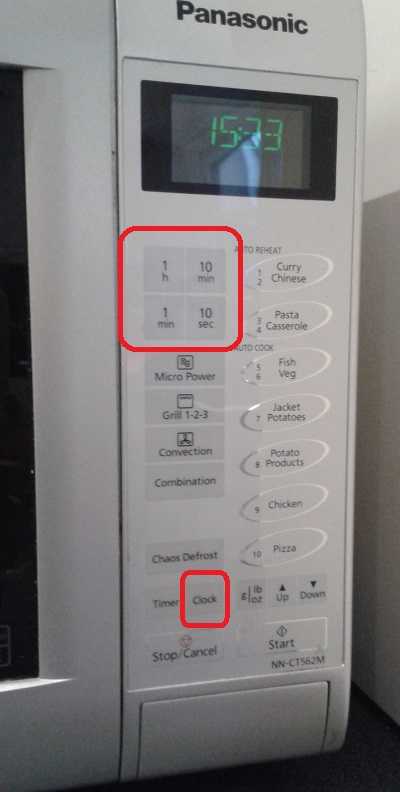
Press and hold the Micro Power button for about 3 to 5 seconds.
The display should change, indicating Demo Mode is now off.
Check the microwave by starting a cooking cycle to confirm normal operation.
Symptoms Of Demo Mode
The microwave does not heat food even though it appears to work.
Buttons and display respond, but no cooking happens.
The display may show flashing numbers or a special demo message.
The fan or light may run without heating.
Managing Beep Sounds
Managing beep sounds on your Panasonic microwave helps control alerts during cooking. These sounds notify you when cooking ends or if buttons are pressed incorrectly. Adjusting beep settings lets you customize your microwave’s feedback to suit your preferences. Below are easy steps to turn beeps on or off and adjust their volume.
Turning Beep On Or Off
Press the Timer/Clock button repeatedly until you see the beep option on the display. The screen will show either “Beep On” or “Beep Off.” Select the setting you want by stopping at the correct option. Press the Stop/Reset button to save your choice. Your microwave will now beep according to your selected setting.
Adjusting Volume Settings
Some Panasonic microwave models allow you to change beep volume. Check your user manual to see if this feature is available. If yes, press the Timer/Clock button to reach the volume settings. Use the arrow keys or number pad to increase or decrease the beep volume. Confirm your choice by pressing the Stop/Reset button. Adjusting volume helps you hear alerts clearly without being too loud.

Credit: www.youtube.com
Troubleshooting Power Issues
Power issues are common problems with Panasonic microwaves. They can stop the appliance from working. Troubleshooting these issues helps avoid costly repairs. It also restores your microwave quickly. Follow simple steps to find the cause and fix it safely.
First, check the power source and internal parts. This ensures the microwave gets electricity properly. Next, avoid using unsafe power connections. These can cause power interruptions or damage.
Testing Outlet And Breakers
Check if the microwave’s outlet has power. Plug another device into the same outlet. See if it works correctly. If not, the outlet might be faulty.
Look at your home’s circuit breaker panel. Find the breaker for the kitchen or microwave. Make sure it is not tripped. Switch it off and on again to reset it. This can restore power to the microwave.
Checking Internal Fuses
Microwaves have internal fuses that protect electrical parts. These fuses can blow and stop the microwave from turning on. To check, unplug the microwave and open the back panel carefully.
Use a multimeter to test the fuse for continuity. If the fuse is blown, replace it with the same type. This step requires caution or a technician’s help to avoid damage.
Avoiding Extension Cords
Do not use extension cords with your microwave. They can cause power drops or sparks. Microwaves need a direct and stable power source.
Plug the microwave directly into a grounded wall outlet. This prevents power issues and keeps your appliance safe.
Heating Problems
Heating problems in a Panasonic microwave can be frustrating. The microwave may turn on but fail to heat food properly. Several simple checks can help fix this issue before calling a technician. Troubleshooting involves inspecting key components and settings that affect heating performance.
Inspecting Door Latch Switches
The microwave will not heat if the door latch switches are faulty. These switches tell the oven the door is closed securely. Open the microwave door and look at the latch area. Check for any broken or loose parts. Press the door gently to see if the switches click. No click means the switch might be defective and needs replacement.
Verifying Power Levels And Settings
Incorrect power level or cooking mode can cause heating issues. Check the control panel for the selected power level. Set it to high or medium-high for proper heating. Also, confirm the cooking time is long enough. Short cooking times may leave food cold. Reset the microwave by pressing Stop/Reset before starting a new cycle.
Deactivating Child Lock
A locked control panel stops the microwave from heating. Look for a lock icon on the display. If active, press and hold the Stop/Reset button for 3 to 5 seconds. This action usually disables the child lock. After unlocking, try heating the food again. The microwave should work normally if the lock was the problem.
Handling Mid-cycle Stops
Mid-cycle stops can interrupt your cooking and cause frustration. These stops often happen due to safety features or minor issues. Handling them properly helps you reset your Panasonic microwave quickly. This section guides you through simple checks and fixes to keep your microwave running smoothly.
Ensuring Door Closes Properly
The microwave stops if the door is not fully closed. Check the door latch and close it firmly. A loose door might trigger a safety stop. Clean the door edges to remove any dirt or food particles. This ensures the door seals tightly and the microwave operates without interruption.
Cleaning Vents For Overheating
Overheating can cause mid-cycle stops. Dust and grease block vents and reduce airflow. Turn off and unplug the microwave before cleaning. Use a soft brush or cloth to clear vents gently. Proper ventilation helps prevent overheating and keeps the microwave working longer.
Examining Control Board
The control board manages microwave functions. Faults here can cause sudden stops. Look for signs of damage like burn marks or loose wires. If you spot issues, consider professional repair. Resetting the control board may fix minor glitches. This step ensures your microwave’s electronics work properly.
Safety Precautions
Safety is the top priority when resetting your Panasonic microwave. Microwaves contain electrical parts that can be dangerous if handled incorrectly. Taking the right precautions can prevent accidents and damage. Always unplug the microwave before starting any work. Avoid touching internal components unless you have the proper tools and knowledge. Read the user manual for safety instructions specific to your model.
Testing Components Safely
Testing microwave parts requires care. Use a multimeter to check electrical components only when the microwave is unplugged. Never test the magnetron or capacitor without discharging them first. These parts can hold a dangerous charge. Wear insulated gloves to protect against shocks. Do not force open the microwave door or tamper with sealed units. Follow step-by-step guides carefully to avoid injury.
When To Call A Technician
Some problems need expert help. Call a technician if the microwave shows sparks, strange smells, or loud noises. Avoid fixing circuit boards or high-voltage parts yourself. Technicians have the training and tools to handle these safely. A professional can also ensure your microwave is repaired correctly. Using your microwave with faulty parts can cause fires or electric shocks. When in doubt, always choose safety and get expert service.
Credit: www.satsig.net
Useful Tips
Resetting your Panasonic microwave can solve many common issues. Knowing useful tips helps you reset it correctly. These tips also keep your microwave working well. Follow simple steps for safe and effective resets.
Reset After Part Replacement
After replacing any part, reset the microwave to refresh its system. Unplug the microwave from the power outlet first. Wait for about one minute before plugging it back in. Press the Stop/Reset button to clear old settings. Then, check if the microwave works normally. This process avoids errors caused by new parts.
Resetting ensures the microwave recognizes the new part. It helps prevent malfunctions and error codes. If problems continue, consult the user manual or service center.
Regular Maintenance Advice
Keep your Panasonic microwave clean to avoid reset issues. Wipe the inside and outside regularly using a soft cloth. Avoid harsh chemicals that can damage the surface. Check the door seal and latch for any damage. A faulty door can cause the microwave to stop working.
Test the power cord and plug for wear or loose connections. Use the Stop/Reset button after cooking to clear settings. This habit helps the microwave stay ready for the next use. Regular maintenance reduces the need for frequent resets.
Frequently Asked Questions
Do Panasonic Microwaves Have A Reset Button?
Panasonic microwaves do not have a dedicated reset button. Use the Stop/Reset button to clear settings or cancel programs. Unplugging the microwave for a few minutes can also reset its functions. For demo or control lock modes, specific button sequences apply to reset.
How To Hard Reset A Microwave?
To hard reset a microwave, unplug it for 5 minutes. Press the Stop/Reset button to clear settings. Plug it back and test. For Panasonic models, hold Stop/Reset to disable child lock or demo mode.
Why Did My Panasonic Microwave Stop Working?
Your Panasonic microwave may stop working due to a tripped breaker, faulty door latch switch, blown internal fuse, or magnetron failure. Check the power outlet, reset circuit breakers, and ensure the door closes properly. Press Stop/Reset to clear child lock or demo mode.
Conclusion
Resetting your Panasonic microwave is a simple process anyone can do. Start by unplugging the microwave for a few minutes. Press the Stop/Reset button to clear any errors. Remember to check if Demo Mode is on and turn it off if needed.
Adjust settings like beep sounds through the Timer/Clock button. These easy steps help fix common problems quickly. Regular resets keep your microwave working well. Try these tips before calling for repair help. Your microwave will be ready to use again in no time.