How to Unlock a Panasonic Inverter Microwave: Quick & Easy Steps

Have you ever tried to use your Panasonic inverter microwave, only to find it locked and unresponsive? It’s frustrating when you just want to heat your food quickly, but the child lock or safety feature keeps you from doing so.
Don’t worry—you’re not alone, and unlocking your microwave is easier than you might think. In this guide, you’ll discover simple, step-by-step methods to unlock your Panasonic inverter microwave fast. Whether you accidentally activated the lock or inherited a locked microwave, these tips will help you regain control in no time.
Keep reading to unlock your microwave and get back to hassle-free cooking!

Credit: www.youtube.com
Common Unlock Methods
Panasonic inverter microwaves often include safety features like child locks. These locks prevent accidental use or changes to settings. Sometimes, the microwave stays locked, and you need to unlock it to use it again. Several common methods help you disable the lock quickly. These are easy steps to try before seeking professional help.
Triple Press Stop/reset
Press the Stop/Reset button three times fast. This action usually turns off the lock. You will see the lock icon disappear on the display. This method works on most Panasonic inverter microwave models. It is the first step to try when the microwave is locked.
Hold Stop/reset Button
Press and hold the Stop/Reset button for about 3 seconds. Keep holding until the lock icon goes away. This method can unlock the microwave if the triple press does not work. It is simple and does not require any other buttons.
Using Child Lock Button
Some models have a dedicated Child Lock button or a key symbol on the panel. Press and hold this button for a few seconds. The lock icon will turn off. This method is helpful on microwaves with touch panels or special safety features.

Credit: shop.panasonic.com
Model-specific Unlock Codes
Panasonic inverter microwaves often use model-specific unlock codes to disable the lock feature. These codes vary depending on the model and control panel type. Knowing the right code or sequence is key to restoring normal use. Follow the exact steps for your model to avoid errors. Some models unlock with button combos, while others need a sequence or clearing settings. Understanding your microwave’s specific unlock code saves time and frustration.
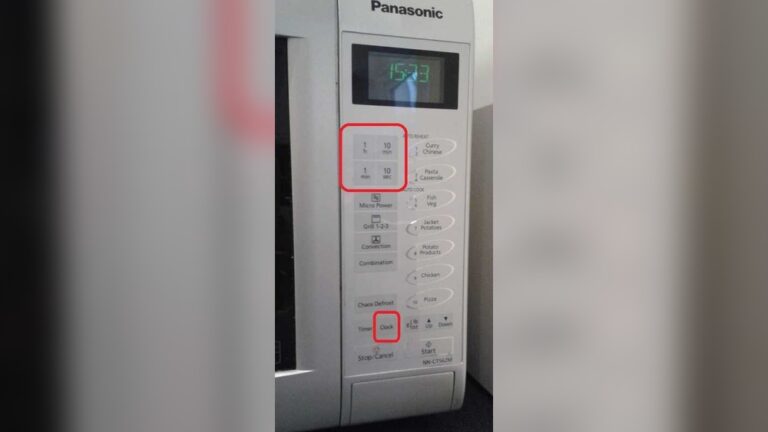
Touch Panel Button Combos
Many Panasonic microwaves with touch panels unlock by pressing a simple button combination. Usually, you press the Stop/Reset button three times fast. The lock icon then disappears, showing the microwave is ready to use. Some models ask you to press Start three times first, then Stop/Reset three times to unlock. These combos are easy to try and often work for child safety locks. Test your model’s combo carefully to avoid locking it again.
Sequence Unlock Steps
Other models require a step-by-step sequence to unlock the microwave. This might include pressing buttons in a specific order, like Defrost, then Timer, followed by Popcorn. Each step must be done within a few seconds. This sequence toggles the lock feature off and on. Check your user manual for exact steps, as timing and button order differ by model. Practicing the sequence a couple of times helps you get it right.
Clearing Settings To Unlock
Some Panasonic microwaves unlock by resetting or clearing settings. Start by pressing the Stop/Reset button to clear any active programs. Then, hold down a specific button or combination for several seconds, like Cancel or Clear. This action can remove the lock feature. Resetting settings does not erase all your preferences but clears the lock status. This method works best after other unlock attempts fail.
Troubleshooting Unlock Issues
Sometimes, Panasonic inverter microwaves fail to unlock easily. The control panel might not respond. This can cause frustration and delay your cooking. Troubleshooting helps identify common problems quickly. Following a few simple steps can resolve most unlock issues.
Focus on the control panel and power cycle first. These are common causes for the microwave lock to stay active. Understanding these steps improves your chances of fixing the problem fast.
Check Control Panel Cleanliness
Dirt, grease, or moisture on the control panel can block touch sensors. Wipe the panel gently with a clean, dry cloth. Avoid using harsh chemicals or too much water. Dirty panels often cause the microwave to stay locked. Cleaning it can restore proper function immediately.
Unplug For Hard Reset
Unplug the microwave from the power outlet. Leave it unplugged for at least one minute. This action resets the internal system. Plug the microwave back in and try unlocking again. Power resets often clear minor errors that lock the microwave.
Consult User Manual
Every Panasonic microwave model has specific lock and unlock instructions. Check your user manual for the exact button combinations. Manuals also explain child lock features and troubleshooting tips. Following the manufacturer’s guide ensures safe and correct operation.
Using Child Safety Lock Feature
The child safety lock feature in Panasonic inverter microwaves prevents accidental use. It keeps children safe and stops the microwave from starting by mistake. This lock disables most buttons and the door operation. Activating and deactivating this feature is quick and simple. Follow the steps below to control the child lock easily.
How To Enable Child Lock
To enable the child lock, press the Stop/Reset button three times quickly. You will see a “LOCK” icon appear on the display. This confirms the lock is active. Once locked, the microwave buttons will not respond. This feature helps avoid unintended use and keeps the microwave safe around kids.
How To Disable Child Lock
Press the Stop/Reset button three times again to disable the child lock. The “LOCK” icon will disappear from the screen. After unlocking, the microwave functions return to normal. If it does not unlock, check if the control panel is clean and dry. Moisture or dirt can block button signals. Refer to the user manual for model-specific instructions if needed.
Tips For Locked Microwave Door
Locked microwave doors cause frustration and delay meal prep. Knowing simple tips can help solve this problem fast. This section covers practical steps to address a locked Panasonic inverter microwave door. These tips ensure safe and easy access without damage.
Inspect Door Obstructions
Check the microwave door for any objects blocking it. Sometimes food particles or small items get stuck in the door seal. Dirt, crumbs, or grease can also prevent the door from opening smoothly. Wipe the door edges and clean the seal gently with a damp cloth. Avoid forcing the door open as it may break the latch or hinges. Inspect the latch area carefully to see if anything is caught inside.
Manual Door Release Options
Many Panasonic microwaves have a manual release option inside. This feature helps open the door if it locks unexpectedly. Look for a small lever or button near the latch mechanism. Refer to your microwave’s user manual to find the exact location. Use a flashlight to see inside the door frame if needed. Press the manual release gently to unlock the door. If unsure, contact Panasonic support or a technician for help.

Credit: shop.panasonic.com
Frequently Asked Questions
How Do I Get My Panasonic Microwave Out Of Lock Mode?
Press the Stop/Reset button three times quickly to unlock most Panasonic microwaves. For touch models, press Start three times, then Stop/Reset three times. Check your manual for model-specific instructions if needed. Ensure the control panel is clean to avoid sensor issues.
How Do I Unlock My Panasonic Inverter?
To unlock your Panasonic inverter microwave, press the Stop/Reset button three times quickly. The lock icon will disappear. For some models, press and hold the Stop/Reset button until the lock clears. Refer to your manual for model-specific instructions.
How To Open A Microwave Door If Locked?
Press the Stop/Reset button three times quickly to unlock most microwaves. Hold the Stop/Reset button for a few seconds if needed. Check your manual for model-specific unlock codes. Ensure the control panel is clean to avoid sensor issues.
Conclusion
Unlocking your Panasonic inverter microwave is simple with the right steps. Press the correct buttons in order to disable the lock. Keep the control panel clean to avoid sensor issues. Always check your user manual for model-specific instructions. Taking these easy actions helps you use your microwave without trouble.
Now you can cook and heat food safely and quickly again.