How to Set the Clock on a Panasonic Microwave: Quick & Easy Guide
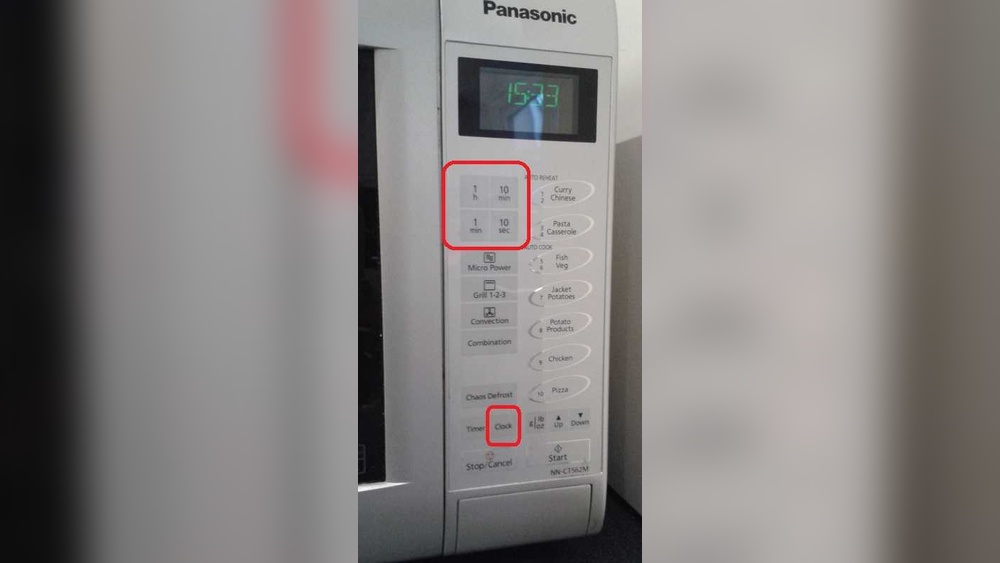
Setting the correct time on your Panasonic microwave might seem like a small task, but it makes a big difference in your daily kitchen routine. If your microwave clock is off or blank, you could miss important cooking steps or simply lose track of time.
You want a quick, hassle-free way to get your clock showing the right time—without digging through a complicated manual or guessing which buttons to press. This guide will walk you through the simple steps to set the clock on your Panasonic microwave, so you can get back to cooking with confidence.
Keep reading, and you’ll have the clock set perfectly in no time!
Clock Setting Basics
Setting the clock on your Panasonic microwave is simple and quick. Knowing the basics helps you keep accurate time for cooking and daily use.
This guide breaks down the key steps to set the clock correctly. Follow each part carefully to avoid errors and save time.
Locating The Clock Button
Find the Clock button on your microwave’s control panel. It is usually labeled clearly and easy to spot.
Pressing this button allows you to enter the time setting mode. The display will start blinking, showing it is ready for input.
Using The Number Pad
Enter the current time using the number pad. Use a 12-hour or 24-hour format based on your microwave model.
Make sure to type the time exactly as you want it to show on the display. For example, 07:30 or 19:30.
Confirming The Time
Press the Clock button again to save the time you entered. The blinking will stop, and the time will stay on the screen.
If the time does not save, try pressing the Clock button twice to confirm on some models. Check your microwave manual for details.

Credit: www.youtube.com
Step-by-step Clock Setup
Setting the clock on your Panasonic microwave is simple. A clear clock helps track cooking times and keeps your kitchen organized. Follow these easy steps to set the correct time.
Pressing The Clock Button
Locate the “Clock” button on your microwave’s control panel. Press it once. The two dots on the digital display will start blinking. This blinking shows the clock is ready to be set.
Entering The Current Time
Use the number pad to enter the current time. Input the hour first, then the minutes. Make sure to use a 12-hour format unless your model specifies otherwise. Double-check the numbers before moving on.
Saving The Time Setting
Press the “Clock” button again to save your time. The blinking dots will stop. The display will now show the correct time. Your microwave clock is ready for use.
Troubleshooting Clock Issues
Setting the clock on your Panasonic microwave should be simple. Sometimes, problems stop the clock from setting properly. This section helps you fix common clock issues quickly. Follow these easy steps to get your microwave clock working again.
When Clock Won’t Set
Press the Clock button twice to start setting the time. Make sure the microwave is not cooking. If the clock still won’t set, check the power and control lock. Sometimes the clock resets if power is interrupted.
Checking Power Connection
Look at the power cord and wall outlet. The microwave must be plugged in firmly. Test the outlet with another device to confirm it works. A loose plug or dead outlet can cause clock problems.
Resetting The Microwave
Unplug the microwave from the power source. Wait about one minute before plugging it back in. This resets the microwave’s system and may fix the clock error. Try setting the clock again after the reset.
Disabling Control Lock
Some Panasonic microwaves have a control lock feature. This lock stops any button from working, including the clock. Check your manual for how to turn off the control lock. Usually, you press and hold a button for three seconds.
Credit: www.hunker.com
Model Variations
Panasonic microwaves come in different models. Each model may have a slightly different way to set the clock. Knowing these variations helps you set the time easily. Some models use simple button presses, while others require specific steps. This section covers common variations to guide you.
Double Press Clock Button
Some Panasonic microwaves need you to press the Clock button twice. The first press activates the clock mode. The second press allows you to enter the time. After entering, press the Clock button again to save the time. This method avoids accidental changes.
Switching Between Am And Pm
Certain models let you switch between AM and PM. Use the number pad to set the hour first. Then press the Clock or AM/PM button to toggle between morning and evening. Make sure the correct period shows before you save the time. This keeps your microwave clock accurate.
Confirming With Ok Or Start
In some Panasonic microwaves, confirming the time needs an extra step. After typing the time, press the OK or Start button. This action saves the setting and stops the clock from blinking. It ensures the microwave shows the right time without errors.
Tips For Easy Clock Setup
Setting the clock on your Panasonic microwave is simple with the right tips. Follow these easy steps to avoid common mistakes and keep your clock accurate. A few small actions can save time and prevent frustration.
Use these tips to ensure a smooth clock setup. They help maintain the microwave’s functionality and keep the time correct for your daily use.
Avoid Setting Clock During Cooking
Do not try to set the clock while the microwave is running. The control panel locks out some functions during cooking. This can cause errors or prevent the clock from updating. Always stop cooking before setting the time. Wait for the microwave to beep and return to standby mode. Then, press the Clock button and enter the time.
Consulting The User Manual
Each Panasonic microwave model may have slight differences in clock settings. The user manual provides the exact steps for your model. It also explains special features or button combinations. Keep the manual handy or find a digital copy online. Following the instructions prevents guesswork and saves time. Manuals often include troubleshooting tips for clock issues.
Regularly Checking Clock Accuracy
Microwave clocks can drift over time and show the wrong time. Check the clock regularly against a reliable source, like your phone or wall clock. Reset the time if you notice any difference. This ensures your microwave timer stays accurate. Regular checks help avoid cooking delays or early alerts. A correct clock also improves your kitchen’s time management.

Credit: www.youtube.com
Frequently Asked Questions
How To Set The Clock On A Panasonic Nn Sb658s Microwave?
Press the Clock button on the Panasonic NN SB658s microwave. Enter the current time using the number pad. Press Clock again to confirm. The display will show the set time.
How Do I Set The Time On A Panasonic?
Press the Clock button on your Panasonic device. Enter the correct time using the number pad. Press Clock again to confirm.
How Do I Set My Microwave Clock?
Press the Clock button until the display blinks. Enter the current time using the number pad. Press Clock again to confirm.
Conclusion
Setting the clock on your Panasonic microwave is simple and quick. Just follow the steps: press the Clock button, enter the time, and press Clock again. Make sure the microwave is not cooking while you set the time. If the clock does not set, check the power and control lock.
Keeping the correct time helps you manage cooking better. Now, your microwave is ready to use with the accurate clock. Easy to do and helpful every day.