How to Set the Time on Panasonic Microwave: Quick & Easy Steps
Setting the correct time on your Panasonic microwave might seem like a small detail, but it makes a big difference in your daily kitchen routine. Imagine starting your cooking timer or defrosting food without worrying about the clock being off.
If you’ve ever struggled to figure out how to set the time on your Panasonic microwave, you’re not alone—and this guide is here to help. In just a few simple steps, you’ll have your microwave clock perfectly synced with your day, making every meal prep smoother and more efficient.
Keep reading to discover the easy way to set your microwave’s time and take full control of your kitchen appliances.

Credit: www.youtube.com
Prepare To Set The Clock
Setting the clock on a Panasonic microwave can sometimes be tricky. The clock might not set properly or the display may not respond as expected. Troubleshooting these issues helps restore the correct time quickly. Follow simple steps to fix common problems and get your microwave clock working again.
These tips work for most Panasonic microwave models. Try them one by one to find the solution that fits your situation.
Press Clock Button Twice If Needed
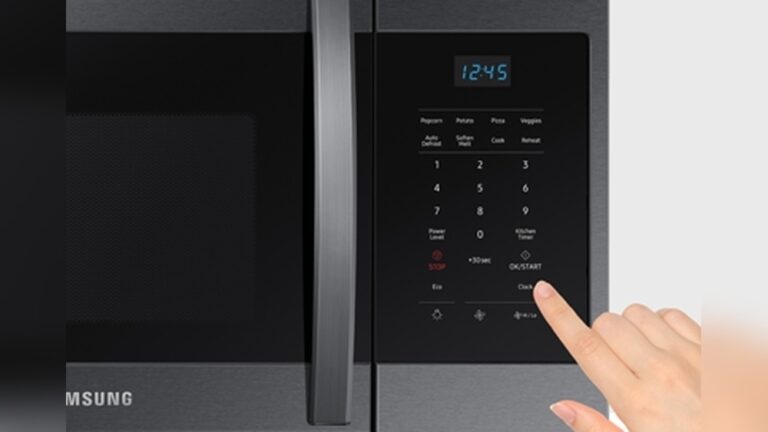
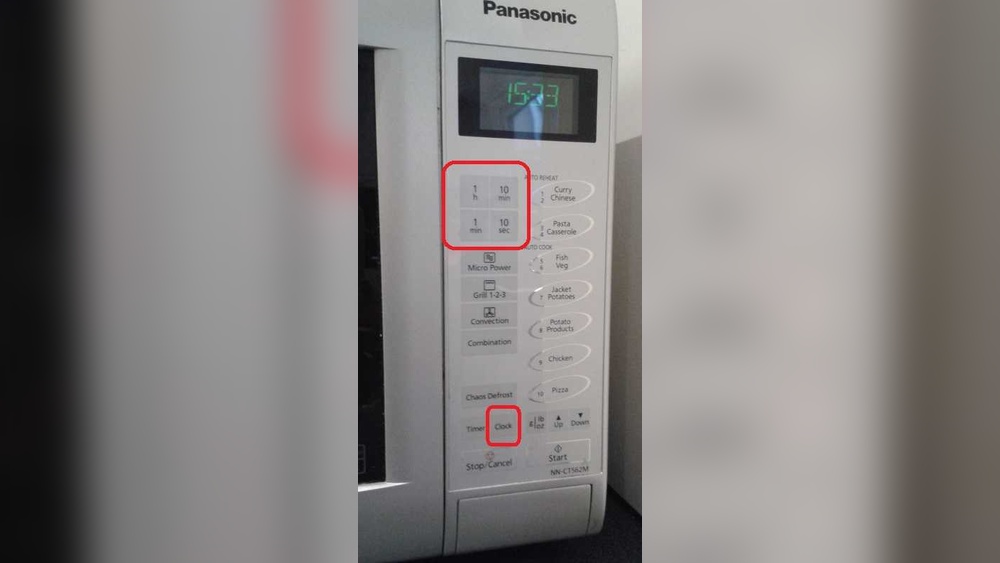
Some models require pressing the Clock button twice. The first press activates the clock mode. The second press allows you to enter the time. If you press only once, the microwave might not register the time input. Try pressing Clock twice, then enter the time using the number pad.
Avoid Setting Clock During Cooking
Setting the clock while the microwave is cooking usually fails. The microwave prioritizes cooking functions over clock settings. Wait until cooking finishes or press Stop before setting the clock. This prevents conflicts and ensures the clock sets properly.
Check Power Connection
A loose or unstable power connection can affect the clock. Make sure the microwave is plugged in securely. If the power flickers or the microwave resets often, the clock may lose its settings. Confirm the outlet works and the plug is fully inserted.
Reset Microwave By Unplugging
Unplugging the microwave for about 30 seconds can reset its internal system. This often clears minor glitches affecting the clock. After unplugging, plug it back in and try setting the clock again. This simple reset can fix many small errors.
Disable Control Lock Feature
The control lock feature prevents changes to settings, including the clock. If the lock is on, the clock buttons won’t respond. Look for a lock icon or check your manual to disable the control lock. Turning it off allows you to set the clock normally.

Credit: help.na.panasonic.com

Credit: www.youtube.com
Frequently Asked Questions
How Do I Set The Clock On A Panasonic Microwave?
Press the Clock button on your Panasonic microwave. Enter the current time using the number pad. Press Clock again to confirm and stop the blinking. The display will show the set time.
How Do I Set The Time On A Panasonic?
Press the Clock button on your Panasonic microwave. Enter the current time using the number pad. Press Clock again to save. The display will show the set time.
How To Set The Clock On A Panasonic Nn Sb658s Microwave?
Press the Clock button once; the display will blink. Enter the current time using the number pad. Press the Clock button again to confirm and save.
Conclusion
Setting the time on your Panasonic microwave is simple and quick. Just press the Clock button, enter the time, and press Clock again to confirm. This helps keep your microwave running smoothly and on schedule. Remember to check your microwave’s manual if the steps vary slightly.
With the correct time set, you can enjoy more accurate cooking and timing. Keep this guide handy for easy reference anytime you need to adjust the clock. A properly set microwave clock makes daily kitchen tasks easier and more efficient.