How Do I Unlock My Panasonic Microwave: Easy Steps Revealed
Is your Panasonic microwave stuck in lock mode, leaving you unable to heat your food? You’re not alone, and the good news is unlocking it is usually quick and simple.
Whether the child safety lock accidentally activated or the control panel froze, knowing the right steps can save you time and frustration. In this guide, you’ll discover easy, step-by-step methods to unlock your Panasonic microwave and get it working smoothly again.
Keep reading to regain full control of your microwave in just minutes!
Credit: help.na.panasonic.com
Child Lock Basics
Understanding the child lock feature on your Panasonic microwave helps keep it safe and secure. This function prevents accidental use and protects children from harm. Learning the basics makes it easier to control and disable the lock when needed.
Purpose Of The Lock
The child lock stops the microwave from starting by accident. It blocks the buttons on the control panel. This safety measure keeps children from turning the microwave on alone. It also prevents unwanted changes to cooking settings.
Common Lock Indicators
Most Panasonic microwaves show a “LOCK” symbol on the display when the child lock is active. Some models may blink lights or beep to indicate the lock is on. The buttons may not respond until the lock is turned off. These signs help users know the microwave is secured.

Credit: www.youtube.com
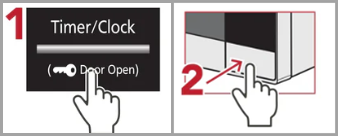
Quick Unlock Steps
Unlocking your Panasonic microwave quickly saves time and frustration. This guide covers simple, fast methods to disable the lock. Follow these steps to get your microwave working again without hassle.
Using Stop/reset Button
Press the Stop/Reset button three times in a row. The lock icon will disappear from the screen. This method works for many Panasonic models.
Wait a few seconds after pressing. Your microwave will unlock and be ready to use.
Button Combination Method
Clear any active timer first. Then press Auto Defrost, Timer, and Popcorn buttons in order. This sequence can disable the child lock on some models.
Be sure to press each button firmly. The microwave display should show that the lock is off.
Power Cycle Reset
Unplug the microwave from the power outlet. Wait at least one minute to reset the control board.
Plug the microwave back in. This resets the system and often removes the lock.
Model-specific Tips
Each Panasonic microwave model has unique features and controls. This means unlocking steps vary by model type. Knowing the model-specific tips helps solve the lock issue fast.
Below are simple guides for different Panasonic microwave models. Follow the steps carefully for your microwave type.
Inverter Microwave Unlocking
Inverter microwaves use advanced power control. To unlock, press the Stop/Reset button three times quickly. The “LOCK” icon should disappear.
If it stays locked, unplug the microwave for one minute. Plug it back and try again. This resets the control board and clears the lock.
Touch Panel Models
Touch panel models have sensitive screens. Press and hold the Stop/Reset button for 3 seconds. This usually disables the child lock.
Sometimes, pressing Auto Defrost, then Timer, and finally Popcorn in order unlocks the panel. Try this sequence if the first step fails.
Genius Sensor Models
Genius Sensor microwaves detect food moisture and adjust cooking. To unlock, press the Stop/Reset button once. If locked, press it three times.
Unplug the unit for a minute if these steps do not work. Refer to the user manual for model-specific instructions. Contact Panasonic support if the lock persists.
Troubleshooting Locked Microwaves
Microwaves sometimes lock unexpectedly, causing frustration. A locked Panasonic microwave may stop working or refuse to open. Troubleshooting locked microwaves helps restore normal function quickly. It involves simple checks and steps anyone can perform. Understanding these steps saves time and avoids unnecessary repairs.
When Unlocking Fails
Try the usual button combinations to unlock. Press the Stop or Reset button three times. Some models require pressing Auto Defrost, Timer, then Popcorn in sequence. If these fail, unplug the microwave for one minute. This resets the control board and may clear the lock.
Persistent lock issues might indicate a deeper problem. The control panel could be faulty or stuck. Avoid forcing the door open to prevent damage. If unlocking attempts fail, proceed to other solutions.
Checking The User Manual
The user manual contains model-specific unlocking instructions. Find the section on child safety or control locks. Manuals often provide step-by-step guides to unlock the microwave safely. If you lost the manual, Panasonic’s website offers downloadable copies. Following the manual ensures correct and safe procedures.
Contacting Panasonic Support
Panasonic customer support can provide expert help. They offer guidance tailored to your microwave model. Support can diagnose control panel or hardware issues. In some cases, they recommend service or repair. Contact details are in the user manual or on Panasonic’s official website.
Activating And Deactivating Child Lock
The child lock on a Panasonic microwave helps prevent accidental use. Activating this feature keeps the microwave safe around children. It also stops the microwave from starting if buttons are pressed by mistake. Knowing how to set and disable the child lock makes your microwave easier to use and safer.
Setting The Lock
To set the child lock, first find the Stop/Reset button on your microwave. Press this button three times in a row. The display will show a “LOCK” icon. This means the child lock is active. Your microwave will not start until you turn off the lock.
Some models may use a different key combination. Check your user manual for exact details. The lock protects the microwave controls from being used accidentally.
Disabling The Lock
To disable the child lock, press the Stop/Reset button once. The “LOCK” icon will disappear. This means the microwave is unlocked and ready to use.
If this does not work, try unplugging the microwave for one minute. Plug it back in and repeat the unlocking step. This resets the control board and clears the lock.
For some models, press Auto Defrost, then Timer, and then Popcorn buttons to unlock. Always check your microwave’s manual for the correct method.

Credit: shop.panasonic.com
Frequently Asked Questions
How Do I Get My Panasonic Microwave Out Of Lock Mode?
Press the Stop/Reset button three times to unlock your Panasonic microwave. If it stays locked, unplug it for one minute. Check your manual for model-specific instructions. Contact Panasonic support if the lock won’t disable after these steps.
How Do You Get A Microwave Out Of Lock Mode?
Press the Stop/Reset button once or three times to unlock. If that fails, unplug the microwave for one minute to reset. Check your model’s manual for exact steps. Contact support if the lock persists.
Why Is The Key Symbol Showing On My Panasonic Microwave?
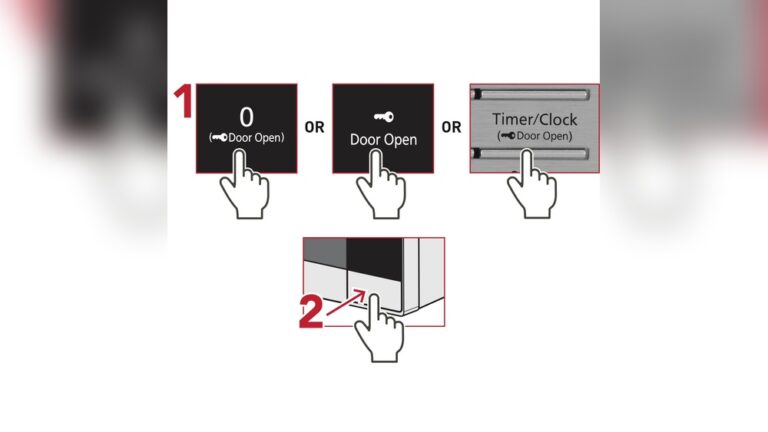
The key symbol on your Panasonic microwave indicates the child safety lock is active. Press the Stop/Reset button three times to unlock it. Unplugging the microwave for a minute can also reset the lock. Refer to your manual for model-specific instructions.
Conclusion
Unlocking your Panasonic microwave is simple with the right steps. Start by trying the Stop/Reset button or a combination like Auto Defrost, Timer, and Popcorn. Unplugging the microwave for a minute often resets the control panel. Always check your microwave’s manual for model-specific instructions.
If the lock still stays on, contacting Panasonic support is wise. These easy methods help you use your microwave without hassle. Keep this guide handy for quick reference next time. Enjoy cooking with your Panasonic microwave unlocked and ready!